

Features

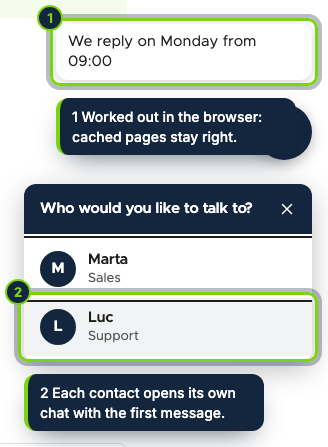
  • Floating chat button printed through hook_page_bottom, with one to three contacts in a keyboard-friendly panel and a first message per installed language
  • Opening hours per weekday in the default store’s time zone, evaluated in the browser so the page cache stays valid; outside them the button says when you reply, or hides
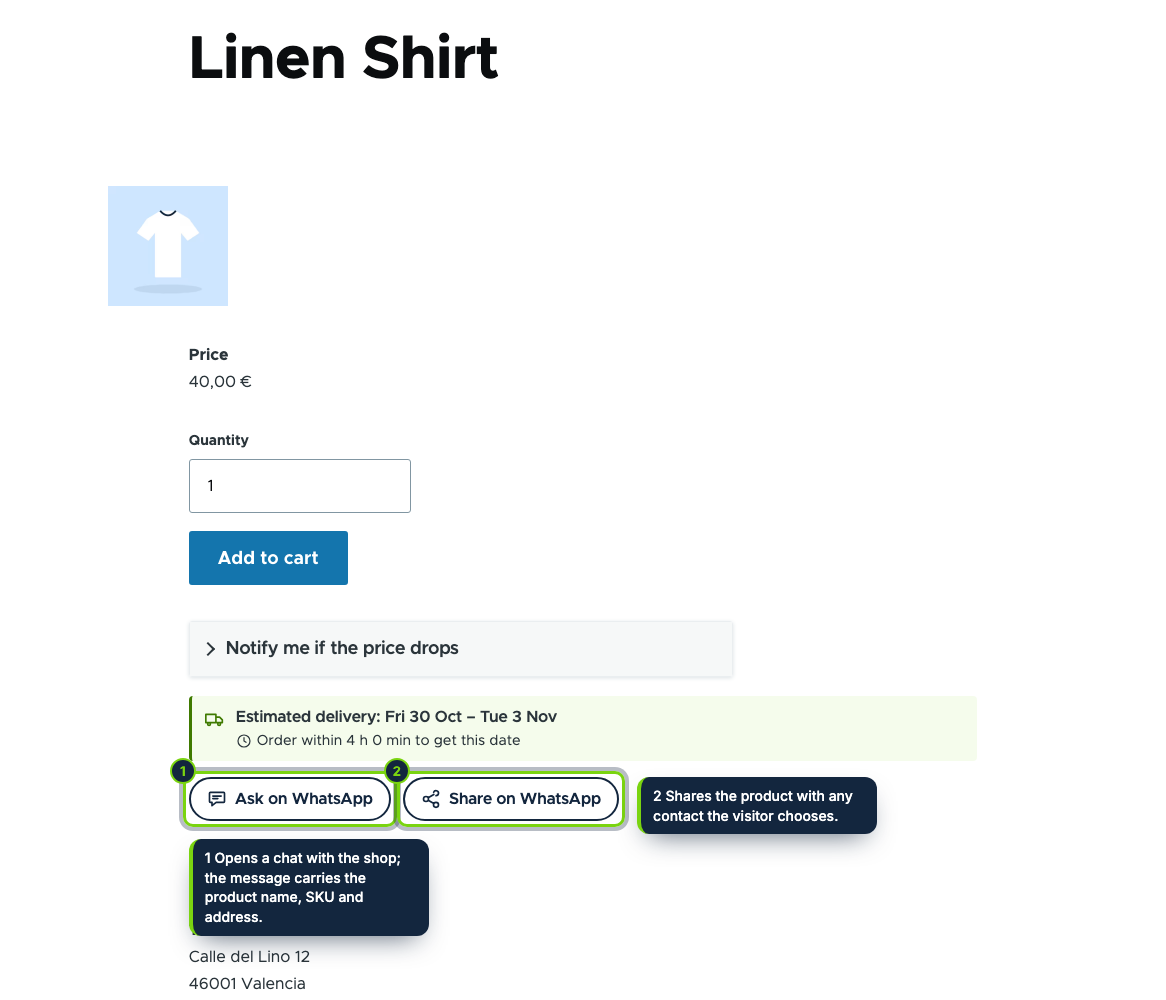
  • “Ask on WhatsApp” and “Share on WhatsApp” as an extra field of every product type, placed in Manage display; the question carries the product title, SKU and address
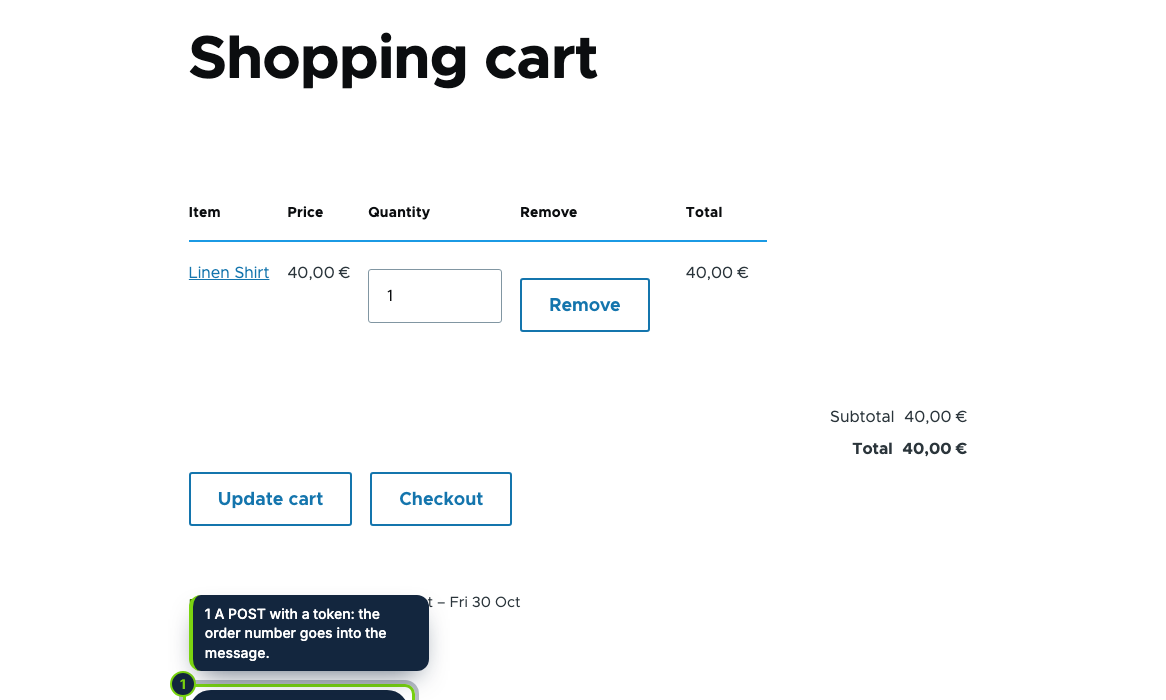
  • Cart message line by line (quantity, product, variation attributes, adjusted line total) under the Commerce cart form
  • Optional order creation for authenticated customers with a billing profile: a token-protected POST places the cart through a new “Awaiting WhatsApp confirmation” state added to every order workflow, unpaid, with its order number in the message
  • Confirm and Cancel transitions on the admin order page, plus three staff templates in the order’s language with the phone of a telephone field normalised to the address country
  • Click counts per button and day, without session, cookie or IP, shown for the last 30 and 90 days; own permission, exportable config with schema, English, Spanish and French

Many customers would rather ask on WhatsApp than fill in a contact form, and some want to order that way too. With Drupal Commerce that usually means a generic chat link with no context and orders typed in by hand. Chat & Order for WhatsApp writes the context for them, the product, the cart or the order, and records WhatsApp orders as proper Commerce orders that your team confirms from the order page. It only builds wa.me links: no API, no account and no third-party script.

How it fits into Drupal Commerce

Versions
Drupal 11.3, Commerce 3.x (Cart, Order, Product, Store) and PHP 8.3, tested with Olivero. Commerce Shipping is not needed.
Store admin
Commerce › Configuration › Store › Chat & Order for WhatsApp, a ConfigFormBase form behind its own permission, with contacts, opening hours, buttons, product categories picked with Drupal’s term autocomplete, the order switch, templates and click counts.
Workflows
hook_workflows_alter adds the state Awaiting WhatsApp confirmation to every order workflow, with its own placing transition (guarded so it is never offered as a button) and Confirm WhatsApp order leading to wherever Place order leads in that workflow. Placing runs Commerce’s own order number, placed time, promotion usage and cart finalisation.
Display
The floating button through hook_page_bottom, the product buttons as an extra field, the cart button after the cart view form and the staff links in the admin order view. Output carries the config cache tag and the module’s own tag and is the same for every visitor of a page.
Phones
From the first telephone field of the billing profile, with the calling code of the address country added to local numbers.

Installation

  1. Step 1

    Get the zip from My account › Downloads on ecom-addons.com and unzip it into modules/custom/.

  2. Step 2

    Enable Chat & Order for WhatsApp in Extend (or drush en ecom_addons_whatsapp_order) and grant Administer Chat & Order for WhatsApp to the roles that need it.

  3. Step 3

    Enter your WhatsApp number in Commerce › Configuration › Store › Chat & Order for WhatsApp; add a Telephone field to the Customer profile type if you want staff to write to customers.

Download the step-by-step guide (PDF)

FAQ

Do I need WhatsApp Business or a paid API?

No. Any WhatsApp number works and nothing is sent until the visitor taps a link.

Will WhatsApp orders break my checkout reports?

No. They are ordinary Commerce orders in their own state, unpaid, and move on to your workflow’s usual state when you confirm them.

What about guests?

Guests and customers without a billing address send the cart as a message; no order is created for them.

Does it work with Drupal’s page cache?

Yes. Opening hours and devices are handled in the browser, and saving the settings refreshes the cached pages.

Is the WhatsApp logo used?

No. "WhatsApp" is a trademark of Meta and is only named to say what the module works with; the icons are our own.

Version history

  1. Loading…

Reviews

Loading…