Features
- Settings and Companies tabs at Commerce › Configuration › Product safety, to register manufacturers and EU responsible persons once and choose store defaults
- A Product safety component per product type that you place or hide in Manage display, like any other field
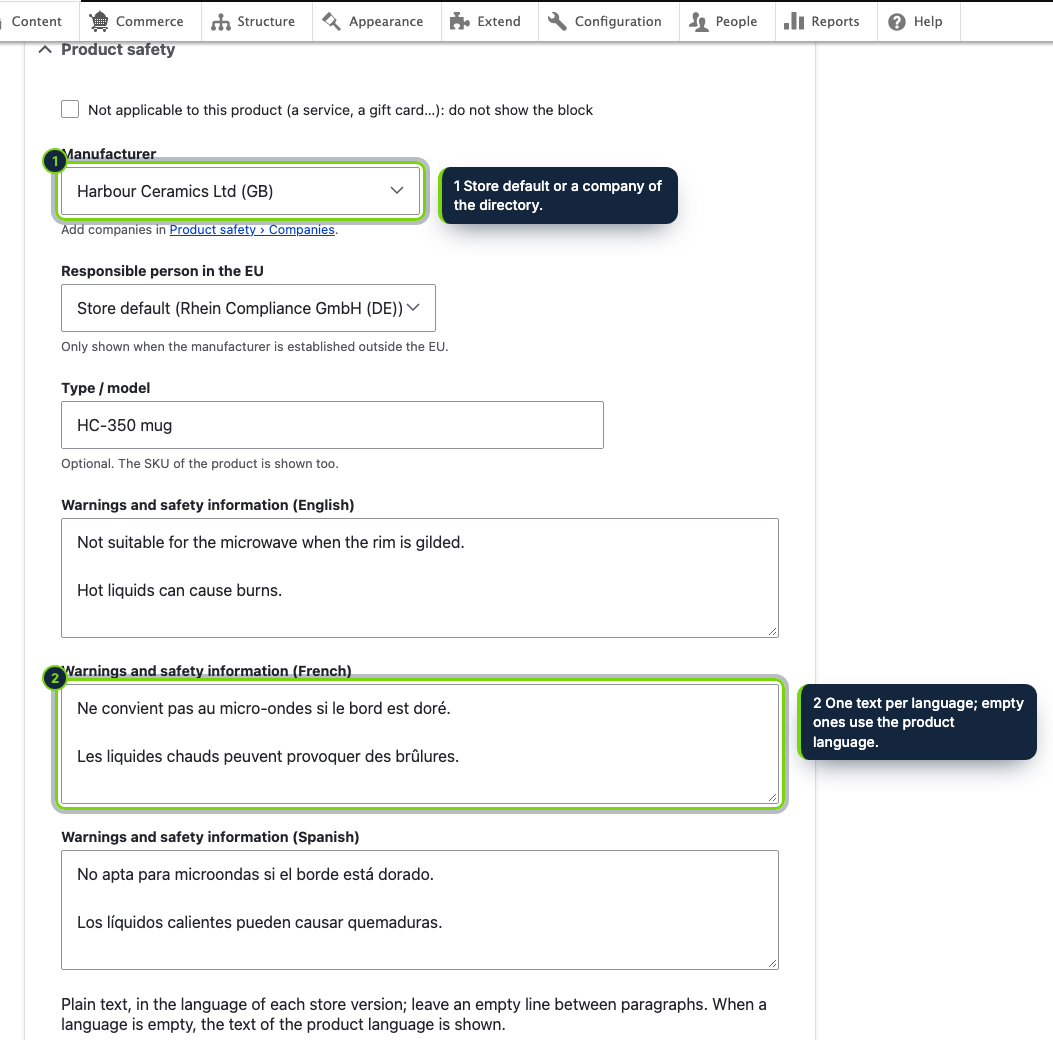
- A Product safety details element in the commerce product form, with one warnings field per site language
- Warnings follow the content language of the page, falling back to the product language, with or without Content Translation
- Identification from the SKU of the default product variation, plus an optional type or model
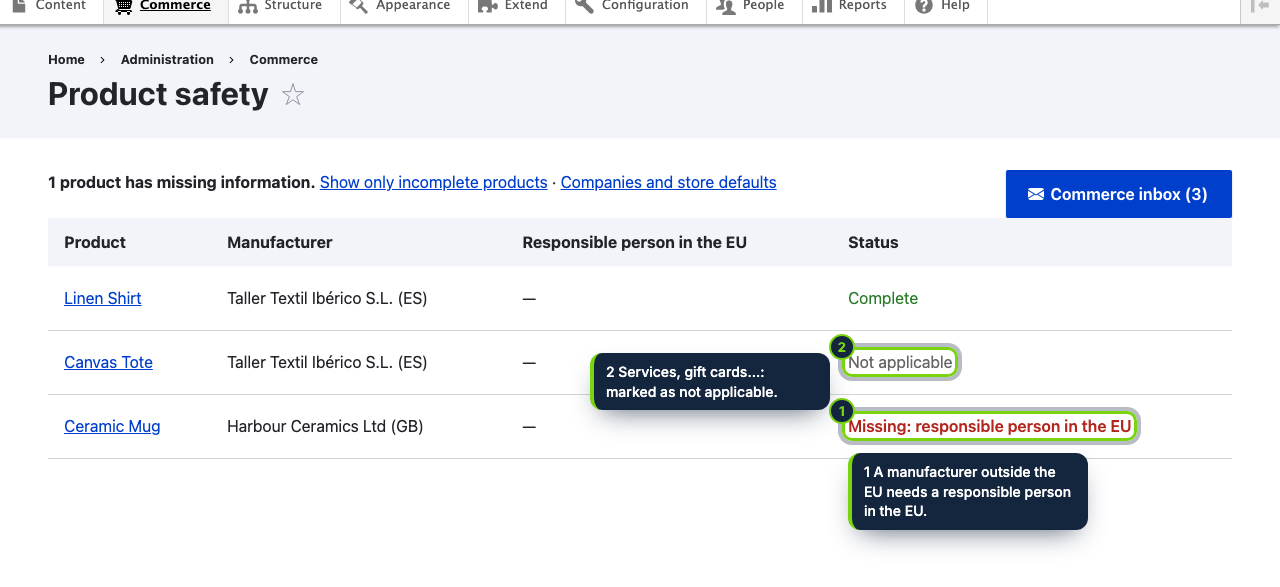
- A status report at Commerce › Product safety listing what each product still lacks, with a Show only incomplete products filter
- Guarded by the Administer product safety information permission; native <details> markup, keyboard accessible, no JavaScript
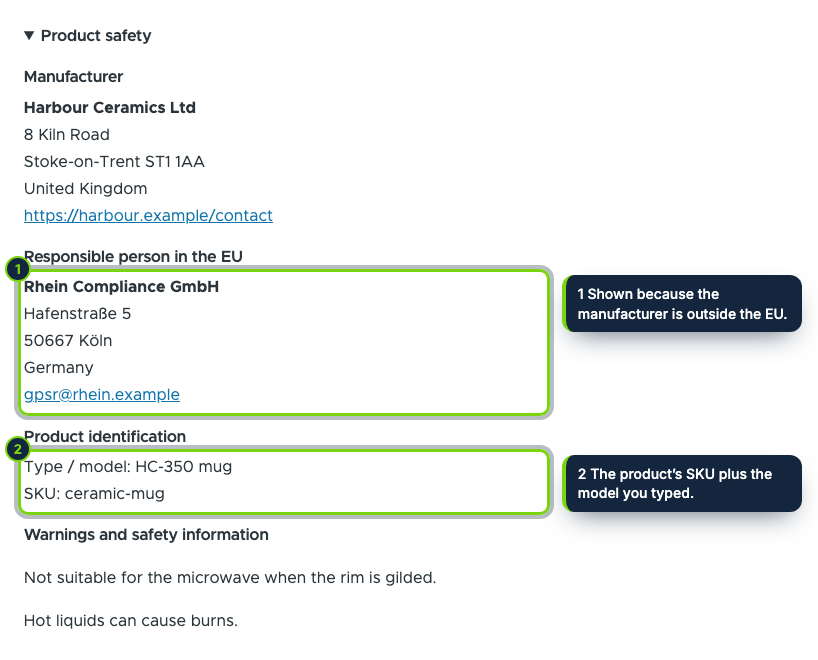
A Drupal Commerce product has a title, variations with SKUs and whatever fields you add, but no shared place for the manufacturer’s postal and electronic address or the person responsible in the EU. Article 19 of Regulation (EU) 2023/988 on general product safety, in force since 13 December 2024, asks online sellers to show that, plus product identifiers and safety warnings, in each offer. This module models those details once and renders them with your products.
How it fits into Drupal Commerce
- Configuration
- Commerce › Configuration › Product safety has two tabs. Companies lists the manufacturers and EU responsible persons (an importer, an authorised representative or a fulfilment service provider) with an Add company action; Settings sets the defaults and whether the block starts expanded.
- Product form
- The Product safety section lets editors keep the store default or choose other companies, add a type or model, enter warnings for each enabled language or mark a product as not applicable.
- Display
- The module declares an extra field on every product type. Move it, or hide it for some types, in Commerce › Configuration › Product types › Manage display; there is no separate placement setting.
- Report
- Commerce › Product safety (
/admin/commerce/product-safety) shows each product’s companies and status, with a count of incomplete products. - Access
- Every admin page requires the Administer product safety information permission.
- Storage
- Three module tables (
ecom_product_safety_operator,ecom_product_safety,ecom_product_safety_text) plus the module settings, all dropped on uninstall; no customer data. - Requirements
- Drupal 11.3, Commerce 3.x (Product), PHP 8.3 or later.
Use it to publish the information, not as legal advice: the accuracy of each product’s data and warnings, and how the GPSR applies to what you sell, remain your responsibility.
Installation
- Step 1
Download the archive from My account › Downloads on ecom-addons.com.
- Step 2
Extract it to
modules/custom/ecom_addons_product_safety. - Step 3
Turn on Product Safety Info (GPSR) in Extend, or run
drush en ecom_addons_product_safety. - Step 4
In People › Permissions, give Administer product safety information to the roles that manage products.
FAQ
Does it need Content Translation?
No. Warnings have one field per site language; the page uses the current content language, then the product language, so it works on single-language and translated sites alike.
Which SKU is shown?
The SKU of the product’s default variation, next to the optional type or model.
Can I put the block somewhere else on the page?
Yes, it is a regular display component: drag it in Manage display for each product type, or disable it where you do not need it.
Version history
- Loading…
Reviews
Loading…
Bought it? Leave a review from your account.