
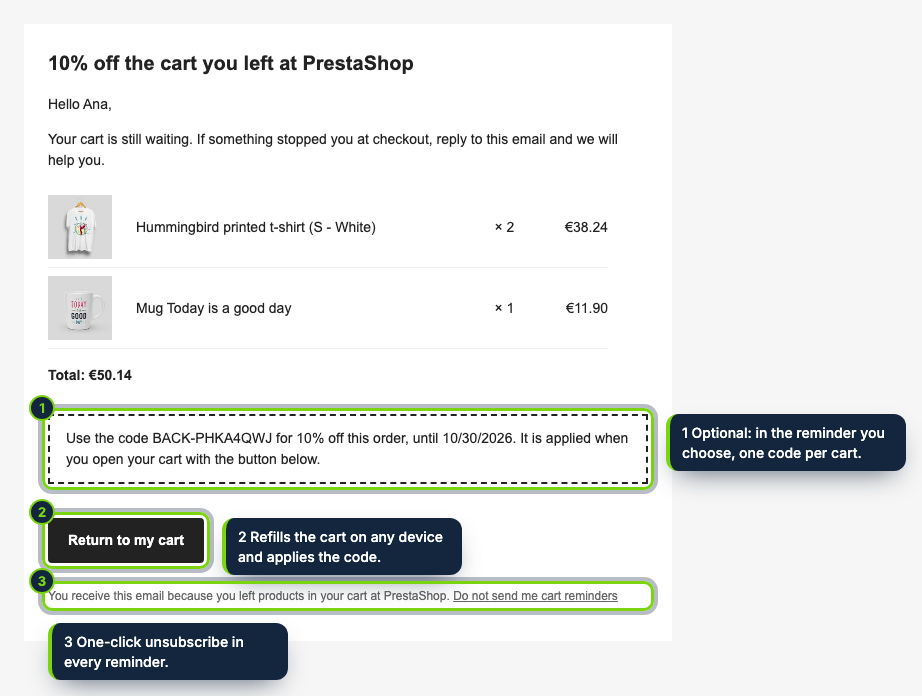
 The second reminder: the products, the total, a single-use discount code and a button back to the cart.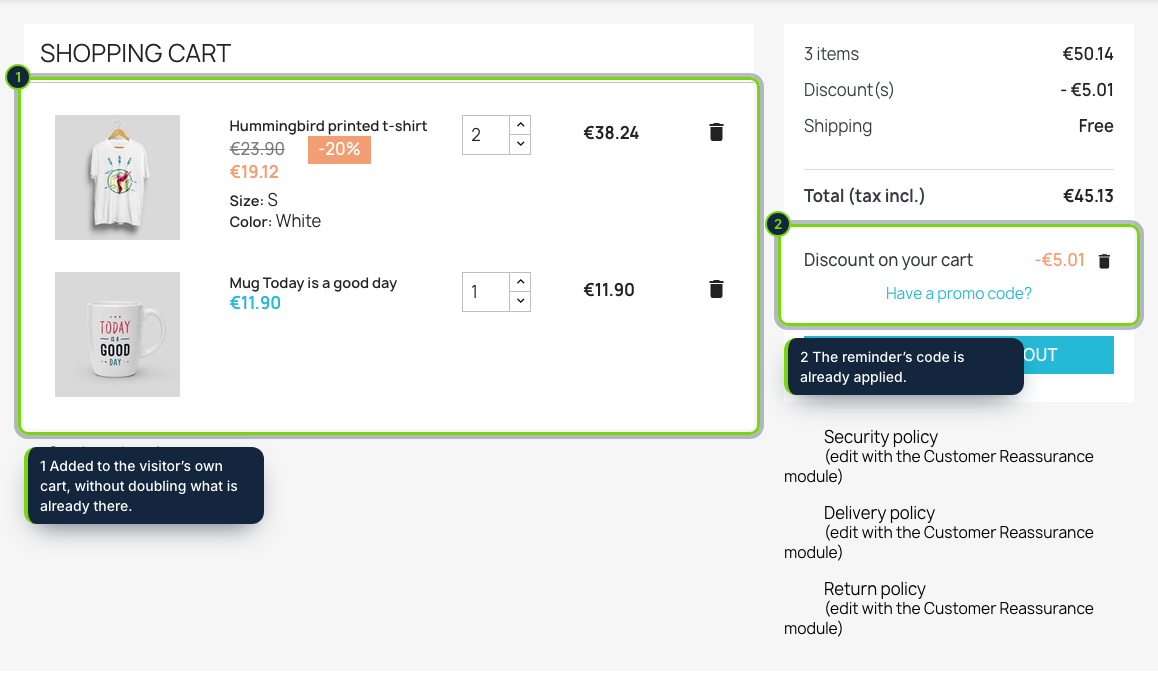
 +1
+1Features
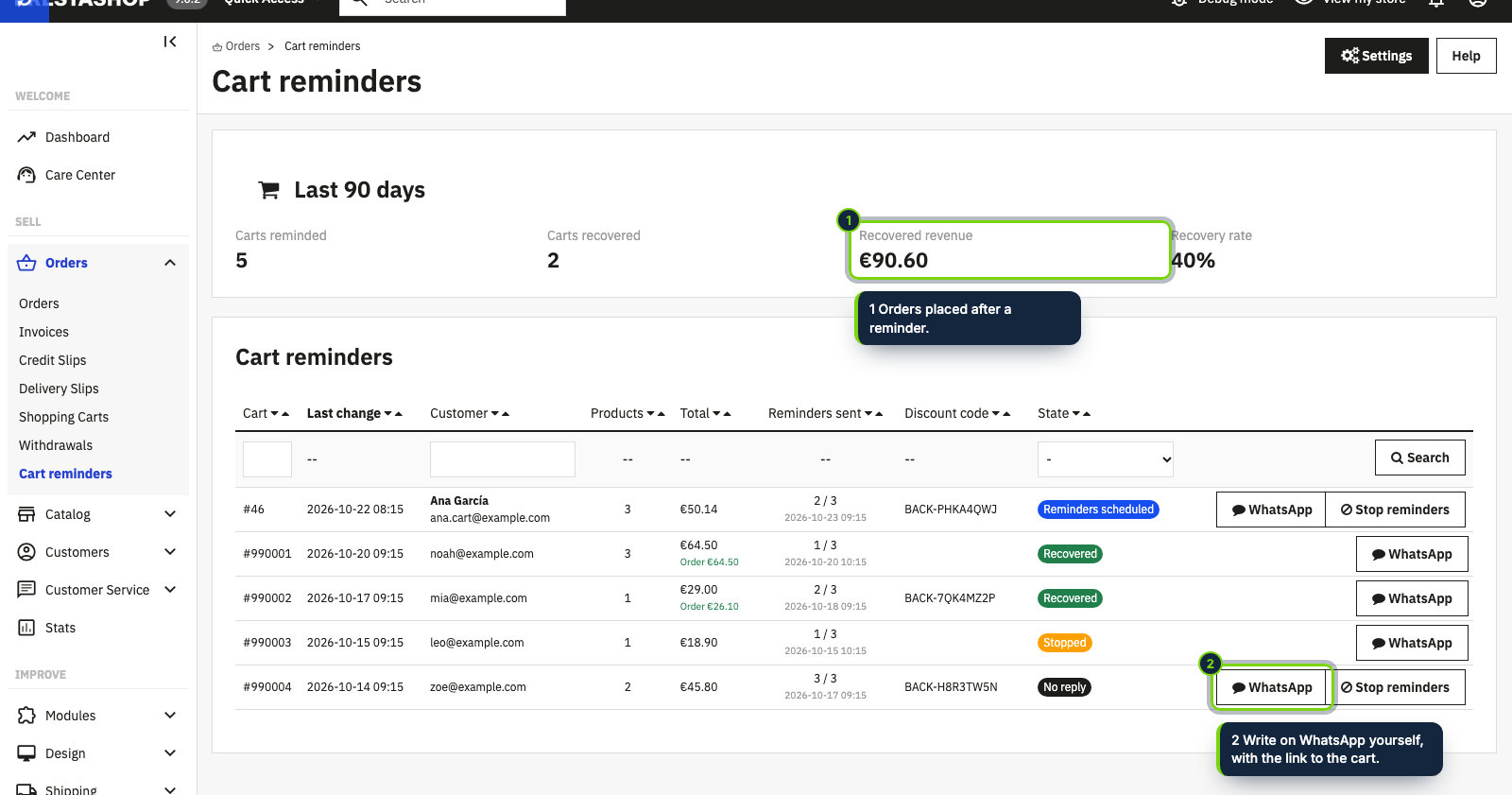
- New Orders › Cart reminders tab in the back office: recovery rate, recovered revenue and every followed cart
- Discount codes are real PrestaShop cart rules (BACK-xxxxxxxx), listed in Catalog › Discounts and removed a day after they expire
- No server cron required: checks run on front-office visits through actionFrontControllerSetMedia, with an optional cron URL for quiet shops
- Hooks into the official GDPR module (psgdpr): tracked carts are exported and erased with the customer’s data
- Option to remind only customers who accepted your newsletter, plus a WhatsApp button to write to them yourself
In a PrestaShop shop, a basket that never reaches the order confirmation simply stays in the carts list, and nobody gets back to that customer. This module follows those carts and sends their owners up to three short emails (after 1, 24 and 72 hours by default), each with a Return to my cart button that refills the cart on any device without logging anyone in. You can attach a one-off percentage discount to one of the emails.
How it fits into PrestaShop
- Built for PrestaShop 8.2 and 9.0 on PHP 8.1 or later, tested with the Classic theme; any theme that keeps the standard cart page works.
- Settings live in Modules › Module Manager › Abandoned Cart Recovery › Configure: delays, the email that carries the code, percentage, validity, minimum cart total and the newsletter-only switch.
- Results and the list of carts are in a new Orders › Cart reminders tab, with Stop reminders and WhatsApp buttons on each row. WhatsApp opens with the phone number of the cart’s address; you send the message.
- It listens to
actionValidateOrderto stop the series when an order comes in, and toactionMailAlterMessageBeforeSendto add one-click unsubscribe headers. The link back to the cart is a friendly/cart-recoveryURL. - Discounts are ordinary cart rules, single-use and not combinable with other vouchers. The reminder templates ship in English, Spanish and French and follow the language of the customer’s cart, guests included.
Installation
- Step 1
Download the zip from My account › Downloads on ecom-addons.com.
- Step 2
In the back office open Modules › Module Manager, click Upload a module and drop the zip.
- Step 3
Open Configure and check the defaults. Carts created before this moment are never contacted.
- Step 4
Optional: call the cron URL shown on the configuration page every 10 to 15 minutes if your shop has few visitors or you want exact timing.
FAQ
Do I need to set up a cron job on my hosting?
No. While customers browse the shop, the module checks the carts at most every 10 minutes, after the page has been served. The cron URL is there for low-traffic shops.
Where do I see the discount codes it creates?
In Catalog › Discounts, like any other cart rule. Each cart gets its own code; unused ones are deleted the day after they expire.
May I send these emails without consent?
It depends on your country: in the EU, art. 13 of Directive 2002/58/EC and its national laws apply. If you rely on consent, turn on the newsletter-only option and mention the reminders in your privacy policy. This is not legal advice.
Version history
- Loading…
Reviews
Loading…
Bought it? Leave a review from your account.