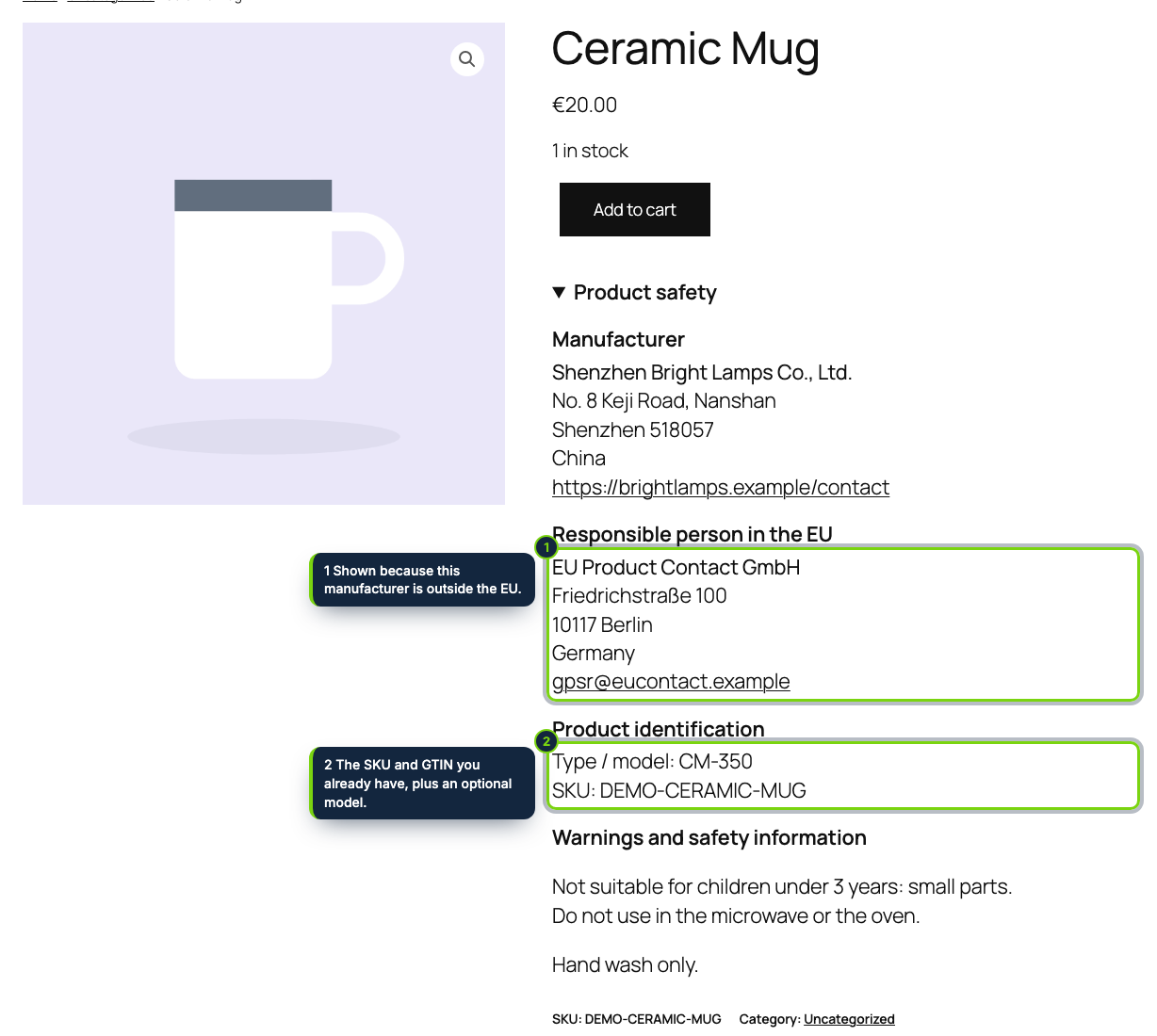
 On the product page, after the add to cart button: who made the product, the EU contact, its identifiers and its warnings.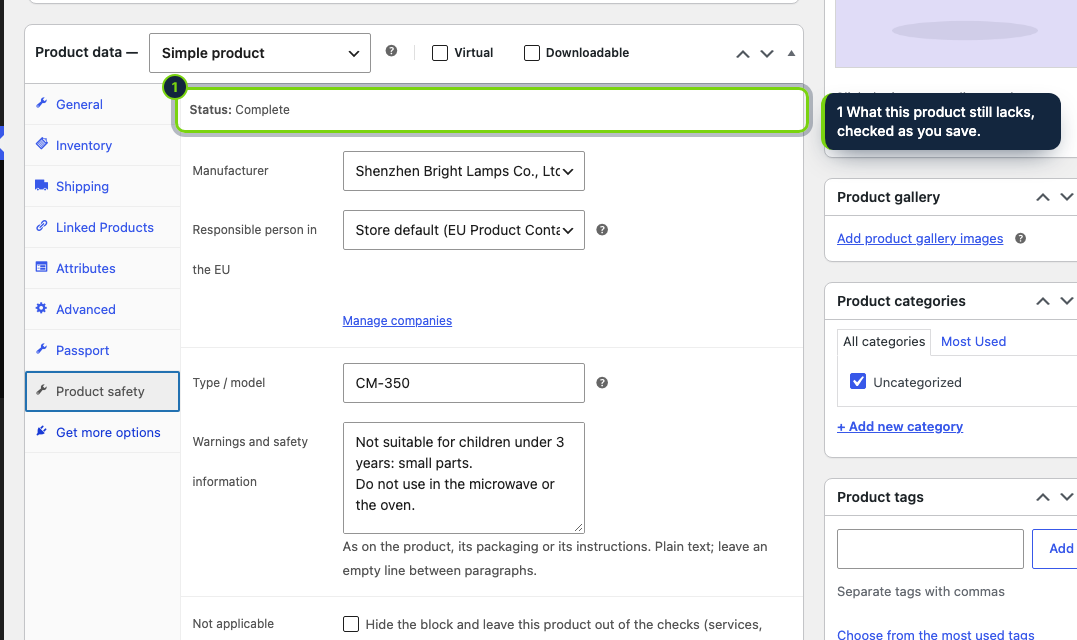
 +1
+1Features
- Products › Product safety in wp-admin: a list of manufacturers and EU responsible persons, plus a catalogue status with counts and filters
- A Product safety panel in the Product data box to override the companies, add a type or model, type warnings or mark the item not applicable
- Reuses the SKU and the GTIN, UPC, EAN or ISBN field of the Inventory tab: no second barcode field to maintain
- Works in block themes such as Twenty Twenty-Five (after the Add to Cart Form block) and in classic themes (in the product summary)
- Or shown as a Product safety tab next to the description through woocommerce_product_tabs
- Store defaults in WooCommerce › Settings › Products › Product safety; virtual products are skipped automatically
- Declares HPOS and cart/checkout blocks compatibility; companies in their own table, product values in post meta, both removed on uninstall
WooCommerce gives every product a SKU and, since recent versions, a GTIN field, but nothing to say who made the item, how to reach them or who answers for it inside the EU. Article 19 of Regulation (EU) 2023/988 (GPSR) has required those details, together with product identifiers and warnings, on online offers since 13 December 2024. This plugin collects them in wp-admin and prints them on the single product page.
How it fits into WooCommerce
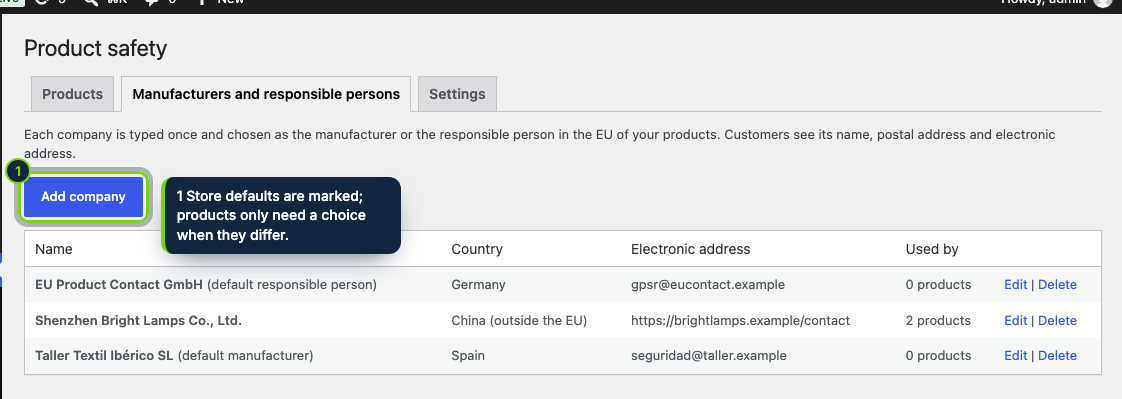
- Products › Product safety
- A submenu of Products for users with the manage_woocommerce capability. One screen manages the companies (name, postal address, country, email and/or contact page, checked on save); the other shows each product as complete, missing (and what) or not applicable.
- Product data box
- The Product safety panel sits beside General, Inventory and Shipping. Leave the companies on the store default or pick others, add a type or model and paste the warnings from the packaging.
- Front end
- On block themes the block is attached after the Add to Cart Form block
(
render_block_woocommerce/add-to-cart-form); on classic themes it joinswoocommerce_single_product_summary. It can also become a tab. It is a<details>element using your theme’s styles, open by default, with no JavaScript. - Settings
- WooCommerce › Settings › Products › Product safety holds the default manufacturer, the default EU responsible person, the placement and the expanded option.
- Storage
- A
wp_ecom_product_safety_operatorstable for companies and_ecom_ps_*product meta. Deleting the plugin removes both and its options; no customer data is kept. - Requirements
- WooCommerce 11.x, WordPress 7.0 or newer, PHP 8.1 or newer.
What you type stays your responsibility: the plugin shows the data but does not check it against the law, and none of this is legal advice.
Installation
- Step 1
Download the zip from My account › Downloads on ecom-addons.com.
- Step 2
Go to Plugins › Add New Plugin › Upload Plugin, choose the zip, then click Install Now and Activate.
- Step 3
Under Products › Product safety, add your manufacturers and any EU responsible person.
- Step 4
Pick the defaults in WooCommerce › Settings › Products › Product safety.
FAQ
Do variations get their own safety details?
The details belong to the parent product and its SKU and GTIN; variations do not have a separate panel.
How do I show warnings in several languages?
Warnings are displayed as typed. With a translation plugin, translate them there; the labels of the block follow the page language (English, Spanish, French included).
Which users can edit the companies?
Anyone with the manage_woocommerce capability, which administrators and shop managers have by default.
Version history
- Loading…
Reviews
Loading…
Bought it? Leave a review from your account.