Features

  • Builds on the native PrestaShop pack (pack product, pack table, stock types): cart, orders and invoices work as usual, with no override
  • A pack builder in Modules › Configure: up to 50 products found by name or reference, shown in the order you choose, with a quantity and a combination for each
  • Multipacks: three of the same mug is one product with a quantity of 3
  • Four ways to price: a percentage or an amount off the products together, a fixed price, or a reduction on each product (100 % makes a free gift)
  • A live price simulation in the form: the products together, the pack price and the saving, tax excluded
  • Each product can follow its own sales or count at its regular price, and can be sold only inside the pack
  • Price and weight are recalculated when you save a product, a combination or a sale; a cron URL covers sales that start or end on a date
  • Stock from the products, or the pack's own stock on top of theirs; never the confusing "default" pack stock type
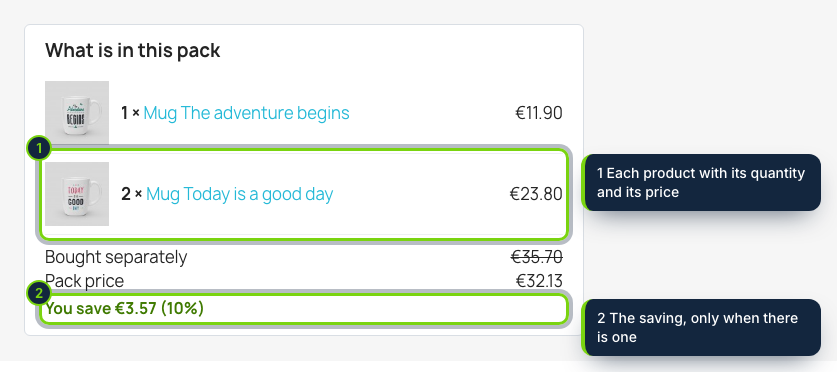
  • Pack page block with images, quantities, prices, the struck-through total and the saving, plus optional descriptions, features and availability of each product, and your own CSS
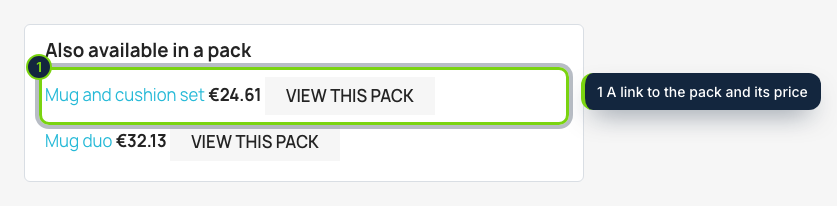
  • Products link to the packs they belong to through displayFooterProduct, with "view" and "buy" buttons, a limit and a sort order
  • Takes over packs made in the catalog without changing their price
  • Works on PrestaShop 8.2 and 9.0

PrestaShop can sell a product made of other products, but setting one up means creating the product, adding the items one by one, working out the price on paper and fixing it every time a part changes. This module turns that into one screen and shows shoppers what they get.

How it fits into PrestaShop

Versions
PrestaShop 8.2 and 9.0 on PHP 8.1 or later, Classic theme tested.
Back office
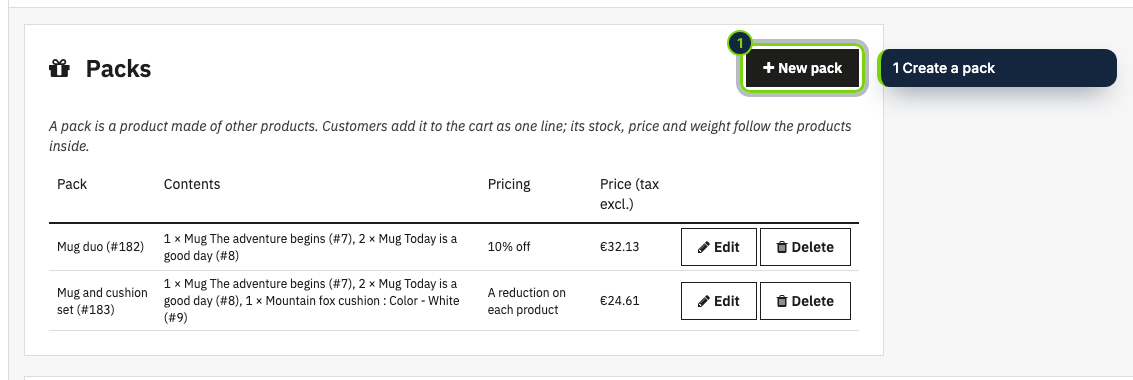
Modules › Module Manager › Configure lists your packs (contents, pricing, current price). The form finds products by name or reference, orders them, and sets a quantity, a combination, a reduction and two switches for each, with a live simulation of the price. The pack is a catalog product, so its description, photos, categories and SEO are edited in Catalog › Products as always.
Native packs
The contents are saved in PrestaShop's own pack table and the product is marked as a pack, so the cart, orders, invoices and stock movements work as they do for any pack. No overrides. Packs you already made in the catalog can be taken over with their current price.
Pricing
A percentage or an amount off the products together, a fixed price, or a reduction on each product (a percentage or an amount; 100 % makes it a free gift). Each product either counts at its regular price or follows its sales, and can be made orderable only inside the pack.
Price and weight
Worked out from the prices (tax excluded) and weights of the products and updated when you save a product, one of its combinations or a sale. A cron URL, with its own secret, brings the packs up to date for sales that start or end on a date.
Stock
From the products (the pack sells as many times as every product allows) or the pack's own stock on top of theirs. The module never leaves a pack on stock type 0, which PrestaShop reads as "shop default".
Front office
A block under the pack page (displayFooterProduct) that can show each product's image, price, short description, features and availability, and a list of packs under each product that belongs to one, with optional "view" and "buy" buttons. One small stylesheet, your own CSS if you want, no JavaScript, no external service, no personal data.
Limits
A pack is one line in the cart and the order, taxed like its first product, so products with different tax rates are better sold separately. Customers cannot change a pack's combinations or quantities, and virtual products cannot be part of a pack.
Installation

  1. Step 1

    Get the zip from My account › Downloads on ecom-addons.com.

  2. Step 2

    In the back office, open Modules › Module Manager, click Upload a module and drop the zip.

  3. Step 3

    Click Configure, then New pack.

Download the step-by-step guide (PDF)

FAQ

Does it use overrides?

No. It uses hooks and PrestaShop's own pack tables.

Can a pack contain another pack?

No: PrestaShop does not allow packs of packs, and the form tells you which products are packs.

Can I give a product away for free in a pack?

Yes: set a reduction of 100 % on it, and tick "Only in the pack" if it must not be bought alone. At least one product must be paid for.

What if a product in the pack goes on sale?

By default the pack price does not change. Tick "Follow its sales" on a product and the pack counts it at its current price. The saving shown on the page always compares the pack with what the products cost separately at that moment, and disappears if there is none.

Which tax does the pack use?

The tax rule of its first product. You can change it in the catalog.

What happens to the pack if I uninstall the module?

The packs stay as normal pack products at their current price and contents; products that were only sold in a pack become orderable again.

Version history

  1. Loading…

Reviews

Loading…