
Features
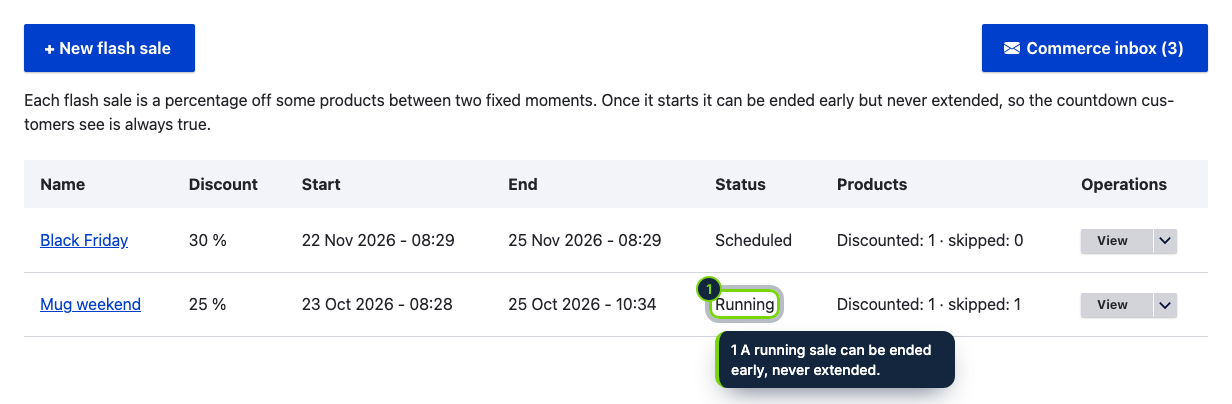
- Flash sales with a name, a percentage off, a start and an end; schedule them days ahead
- The discount is the variation price, with the previous price kept as list price, so cart, taxes, orders and other addons treat it as an ordinary sale
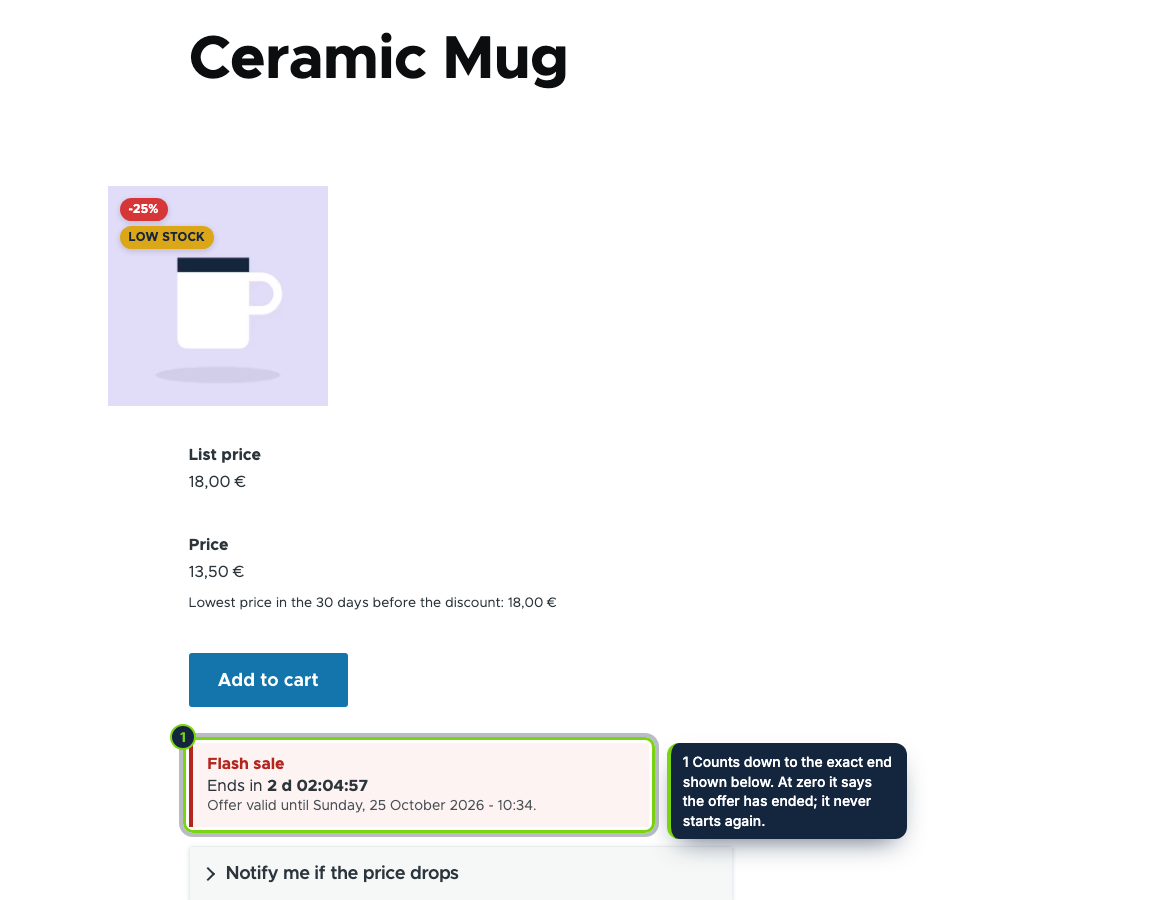
- A countdown on the product page, with the exact end date and time, that never restarts; move it in Manage display
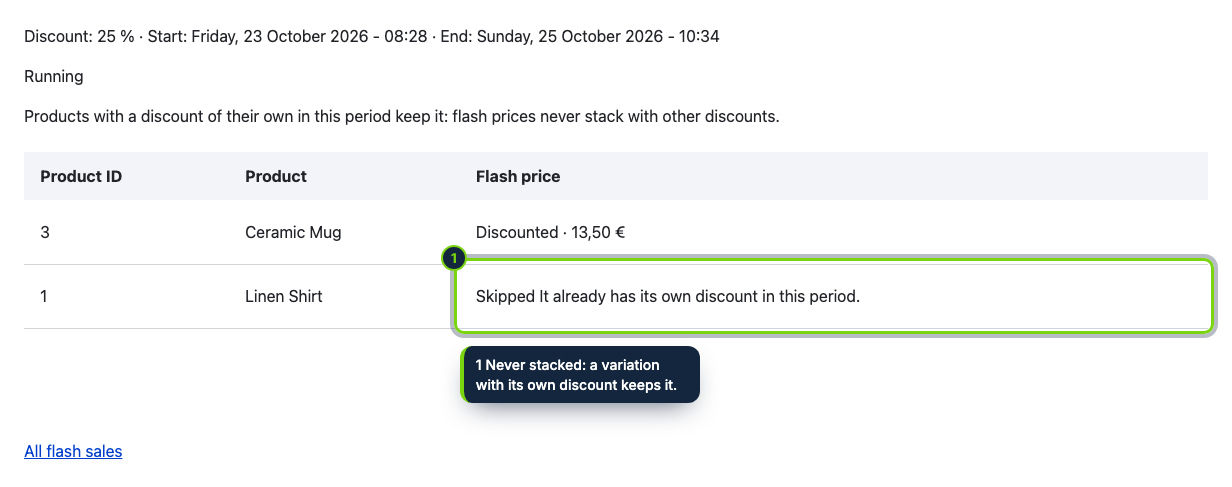
- Never stacks: products that already have a discount in that period keep theirs and are listed as skipped
- A running sale can be ended early but never extended; ended sales cannot be restarted
- Commerce › Flash sales: the list of sales with their status, and per sale which variations got the flash price and why others did not; in English, Spanish and French
A flash sale works because the deadline is real. Flash Sales Countdown takes a percentage off the products you pick between two fixed moments and shows customers how long is left, on the product page. The countdown is honest: it counts down to the end you set and, at zero, says the offer has ended. Once a sale has started its end can be brought forward but not pushed back, and an ended sale cannot be restarted: EU law (Directive 2005/29/EC, Annex I, point 7) treats falsely claiming that an offer is only available for a very limited time as an unfair practice in all circumstances. Products that already have their own discount in that period are left as they are and listed with the reason, so every flash price is a real reduction on what customers were paying.
How it fits into Drupal Commerce
- Versions
- Drupal 11.3 with Commerce 3.x on PHP 8.3 or later. Cron is recommended, but prices also switch at the first page view after a start or an end.
- Variation prices
- When a sale starts, each variation of the chosen products gets the flash price as its price and the price it replaces as its list price; both are put back at the end, unless you changed the price by hand meanwhile. Cart, taxes, orders and other addons see an ordinary sale price.
- No stacking
- A variation whose list price is already above its price keeps it, and the product is listed as skipped with the reason. A product cannot be in two flash sales whose dates overlap.
- Store admin
- Sales live under Commerce › Flash sales and the countdown setting under Commerce › Configuration › Flash sales, all behind the single "Administer flash sales" permission, which you grant per role.
- Product display
- The countdown is a component of the product display; move or hide it per product type in Manage display. It works with page caches and, without JavaScript, still shows the end date.
- Omnibus
- As the reduction is an ordinary sale price, our Lowest Price in 30 Days (Omnibus) addon, or any other that reads sale prices, shows the prior price under it.
Installation
- Step 1
Download the zip from My account › Downloads on ecom-addons.com and unpack it into
modules/custom/, so the folder isecom_addons_flash_sales. - Step 2
Enable Flash Sales Countdown in Extend, or run
drush en ecom_addons_flash_sales. - Step 3
In People › Permissions, give Administer flash sales to the roles that manage promotions.
- Step 4
Open Commerce › Flash sales, click New flash sale and set a name, a percentage (1 to 90), a start, an end (at most 31 days later) and the products.
FAQ
Can I extend a sale that is running?
No. A running sale can only be ended early with "End now"; its end cannot be moved later and an ended sale cannot be restarted, so create a new sale if you need one.
What happens to products that are already discounted?
They keep their own discount and are listed as skipped, with the reason, in the details of the sale. The check is done when you save and again when the sale starts.
Can I hide the countdown but keep the discount?
Yes. Switch off "Countdown on product pages" in Commerce › Configuration › Flash sales: the discount still starts and ends on time. Category or whole-catalog selection, countdowns in product lists, a store-wide banner and stock limits are planned for later versions.
Version history
- Loading…
Reviews
Loading…
Bought it? Leave a review from your account.