

Features

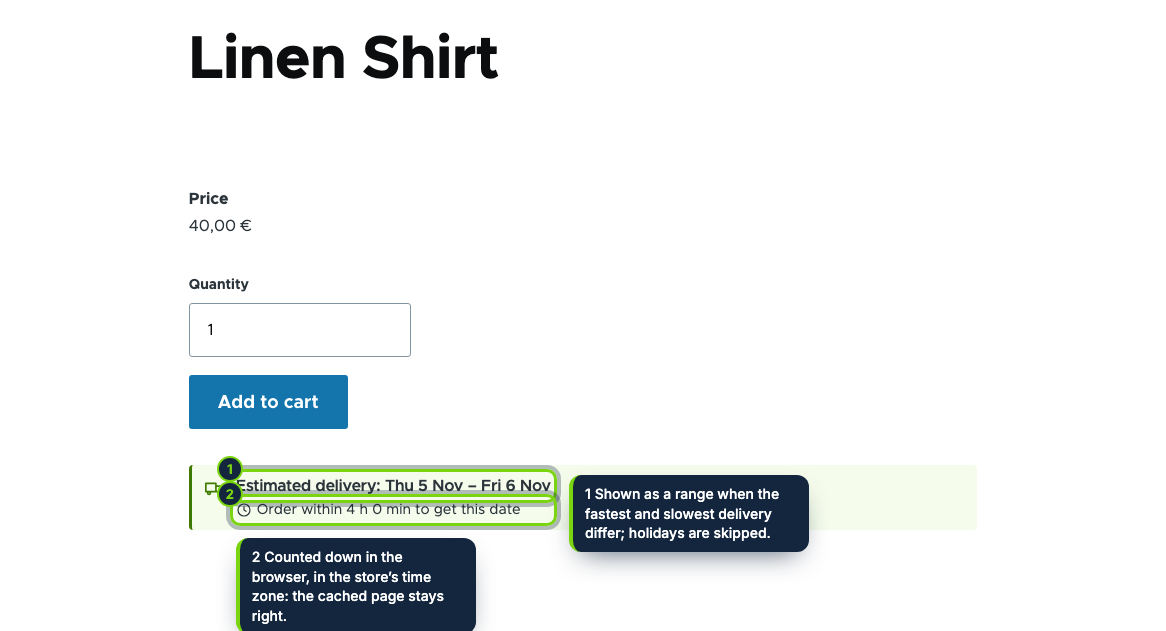
  • Estimated delivery date as an extra field of every product type, placed in Manage display; the same cached HTML for all visitors, with the countdown and the date worked out in the browser in the default store’s time zone
  • Business-day calendar: cut-off time per weekday, preparation days for the store and per category or product picked by autocomplete, delivery weekdays and closed dates, with a range when the fastest and slowest delivery differ
  • National holidays of fifteen countries computed for every year, Easter-based days and substitute days included, preselected from the default store’s address and untickable one by one
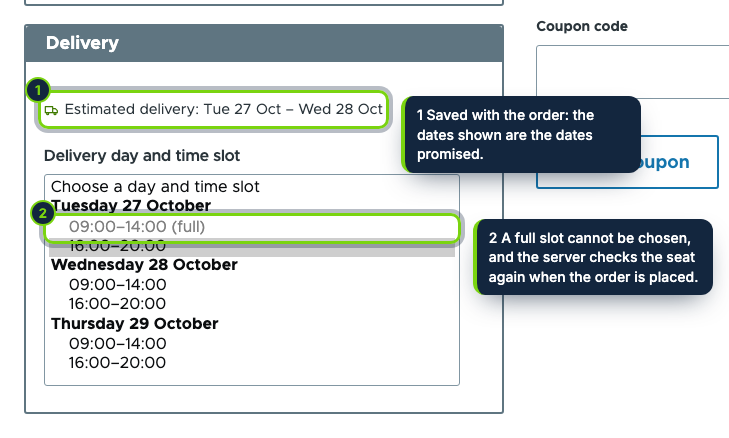
  • “Delivery” checkout pane in the Order information step: the order’s estimate and a day and slot select, full slots disabled, the posted value checked again on the server
  • No overbooking: each booking inserts a numbered seat under a primary key in its own table, held during checkout and confirmed by the order’s place transition
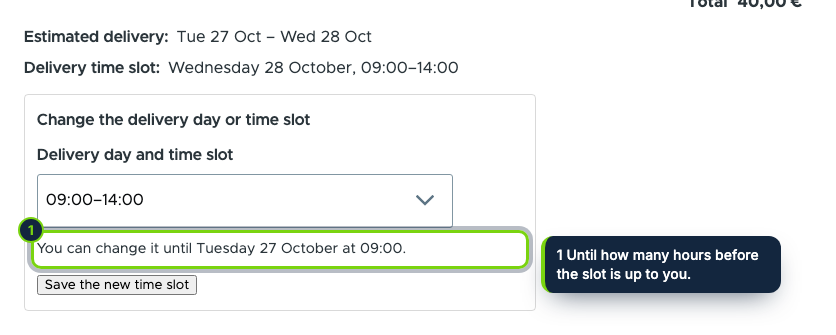
  • The dates shown and the chosen slot saved per order and printed on the review step, in Commerce’s order receipt, on the admin order view and in a Delivery column of the orders view
  • Customers move their slot from their order page with a CSRF-protected form until the hours you set; staff get a printable delivery sheet per day with a tokenised CSV export, behind its own permission
  • Works without Commerce Shipping; settings in one exportable configuration object with schema; English, Spanish and French

Shoppers want to know when the parcel will be at their door, and a vague "ships in 2–4 days" does not tell them. Merchants who deliver themselves also need people to pick a day and an hour without promising more vans than they have. Drupal Commerce has neither out of the box. This module works out an estimated date from your real calendar, lets customers book a time slot at checkout and stores what was promised with every order.

How it fits into Drupal Commerce

Versions
Drupal 11.3, Commerce 3.x (Cart, Checkout, Order, Product, Store) and PHP 8.3, tested with Olivero and Claro. Commerce Shipping is not required: one rule applies to every order.
Store admin
Commerce › Configuration › Store › Estimated Delivery Date & Time Slots, a ConfigFormBase form behind its own permission, and Commerce › Delivery sheet behind a second one.
Catalogue
An extra field on product displays, cached with the configuration tag; Big Pipe and the internal page cache keep serving one HTML to everybody.
Checkout flows
A CommerceCheckoutPane plugin placed in the Order information step of every flow, with a summary on the review step. Seats are confirmed on commerce_order.place and freed on cancel or deletion.
Orders and mail
The admin order view, the customer’s order page (commerce-order--user), a Views field in the orders list and the order receipt through hook_mail_alter.

Installation

  1. Step 1

    Download the zip from My account › Downloads on ecom-addons.com and unzip it into modules/custom/.

  2. Step 2

    Enable it in Extend or with drush en ecom_addons_delivery_date, then grant the two permissions.

  3. Step 3

    Check the cut-off times and holidays in the settings and, if you deliver yourself, write your slots, such as 09:00-14:00 x5, 16:00-20:00 x3.

Download the step-by-step guide (PDF)

FAQ

Do I need Commerce Shipping?

No. Without it every order follows one rule; per shipping method rules come later.

Can two customers take the last slot at the same time?

No. A seat is a row under a primary key, so only one of the two inserts succeeds and the other customer is asked to choose again.

Where do phone numbers on the sheet come from?

From the first telephone field of the billing profile; add one to the Customer profile type with core’s Telephone module.

Does the page cache show yesterday’s date?

No. The page carries the rules and the visitor’s browser picks the date, so a cached page is right the next day too.

Version history

  1. Loading…

Reviews

Loading…