

Features

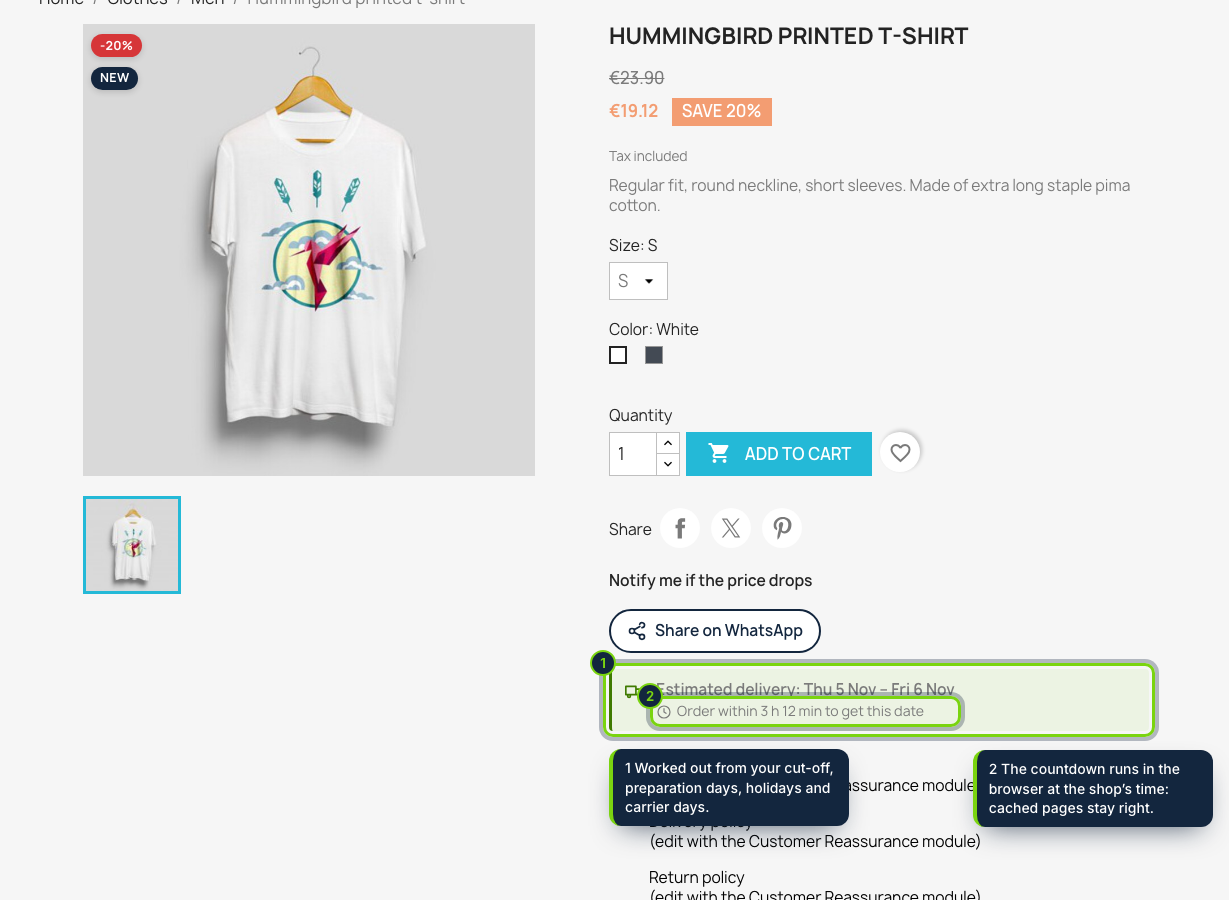
  • Estimate block in displayProductAdditionalInfo with “Order within 3 h 12 min to get this date”: Classic theme, redrawn for each combination and its stock, identical HTML for every visitor so the full-page cache stays valid
  • Dispatch calendar in the PS_TIMEZONE of the shop: cut-off per weekday, preparation days for the shop, per category and per product (picked with a search box, not typed IDs), and closed dates such as stocktaking
  • National public holidays of 15 countries worked out for every year, Easter-based days included, shown with a tick box per holiday in Modules › Configure
  • Fastest and slowest days per carrier (by id_reference, so edited carriers keep their rule) and per delivery country: “Thu 5 Nov – Fri 6 Nov” instead of a made-up single day
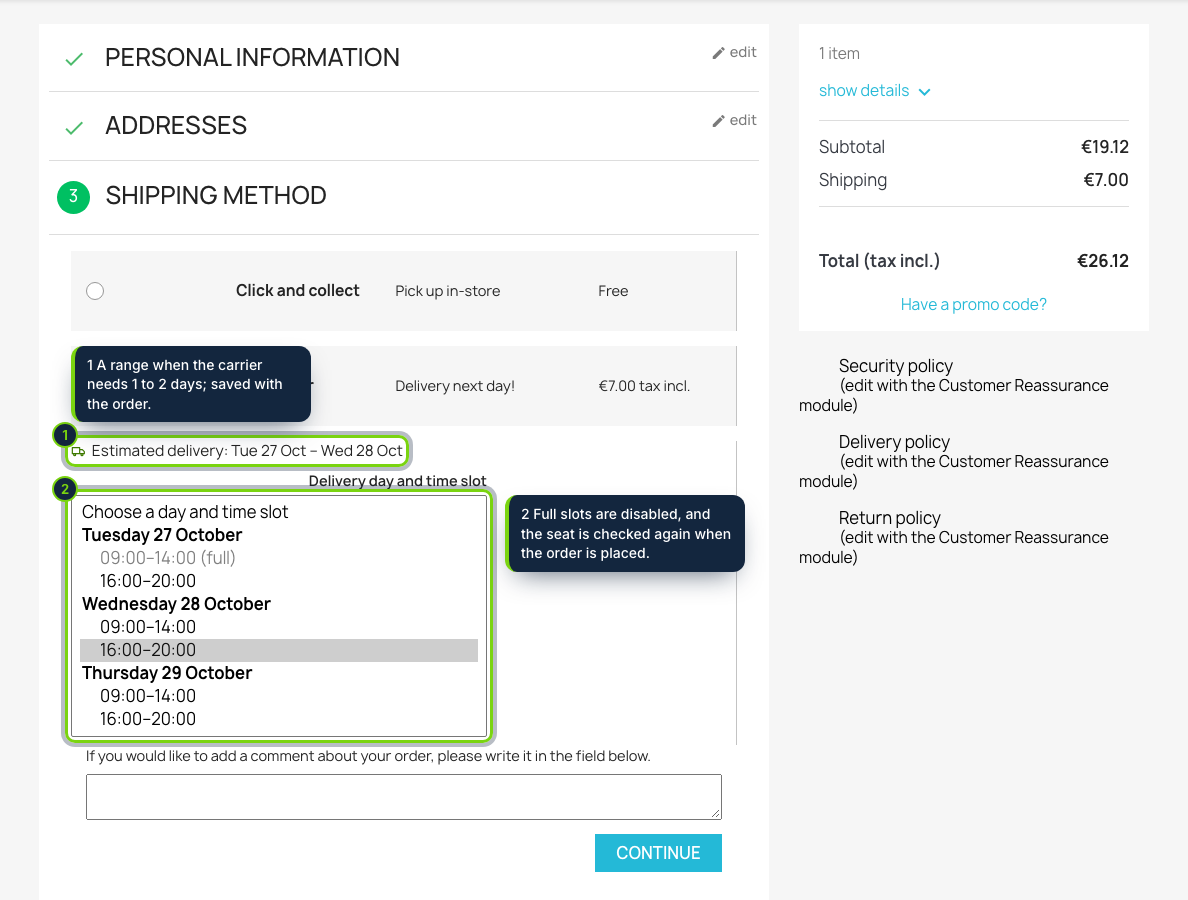
  • Time slots for your own van in the shipping step, e.g. 09:00-14:00 for 5 orders and 16:00-20:00 for 3; full slots greyed out, the choice checked again on the server and a numbered seat per order under a database key, so simultaneous orders never exceed the capacity
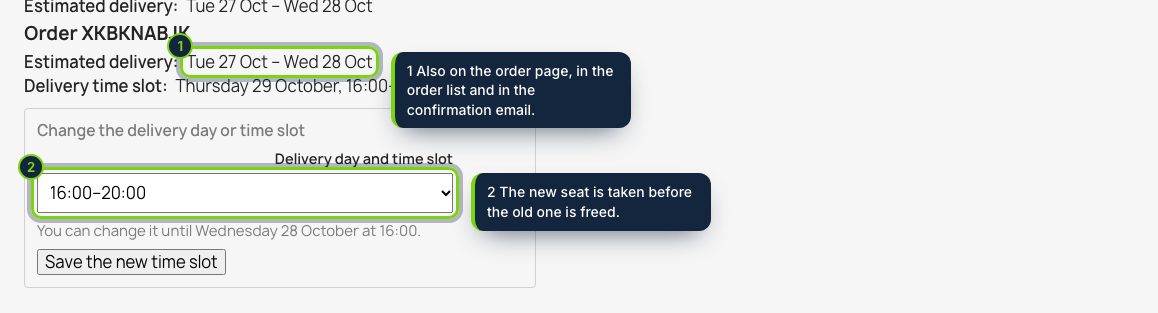
  • The promise stored with each order: panel on the Symfony order page of PrestaShop 8 and 9, “Delivery” column in Orders, lines added to the order_conf email, “My deliveries” and order details in the customer area
  • Customers move their slot from their account until the deadline you set (24 hours before by default)
  • Orders › Delivery sheet: one day’s orders by slot with address, phone and items, printable without the back-office menus, plus CSV; no override, English, Spanish and French included

A PrestaShop shop usually shows the carrier’s vague “24-48h” delay, and only after the shopper has reached the shipping step. Estimated Delivery Date & Time Slots puts a real, dated estimate in front of them from the product sheet onwards, worked out from your own dispatch calendar, and, when you deliver yourself, lets them book the day and time slot your van can actually cover.

Every date is labelled as estimated. When the carrier needs between two and four days the shopper sees a range, and the dates shown for the chosen carrier are saved on the order, so you always know what was promised.

How it fits into PrestaShop

Versions
PrestaShop 8.2 and 9.0 on PHP 8.1 or later, tested with the Classic theme. No override.
Back office
Modules › Module Manager › Configure holds the cut-off times, preparation days (with product and category search), delivery weekdays, the holiday country with a tick box per holiday, closed dates and one row per carrier for its days, countries and slots. Orders › Delivery sheet is added to the menu.
Front office
displayProductAdditionalInfo on the product page, displayShoppingCartFooter in the cart and displayAfterCarrier in the shipping step, where each carrier’s estimate and slot list sit under its own row. The choice is checked when the shopper presses Continue (actionCarrierProcess) and confirmed in actionValidateOrder.
Orders
A panel in displayAdminOrderSide, a column added to the Orders grid, lines in PrestaShop’s own order_conf email and a “My deliveries” page in the customer account (displayCustomerAccount, displayOrderDetail). Cancelled or refunded orders free their slot.
Caching
Product pages carry the rules and the browser does the countdown, so a cached page is still right at 13:59 and at 14:01.

Installation

  1. Step 1

    Download the zip from My account › Downloads on ecom-addons.com.

  2. Step 2

    In the back office, open Modules › Module Manager, click Upload a module and choose the zip.

  3. Step 3

    Click Configure: dates show at once with a 14:00 cut-off, your country’s holidays and 2 to 4 days; adjust the carriers and, for your own delivery, write its slots such as 09:00-14:00 x5, 16:00-20:00 x3.

Download the step-by-step guide (PDF)

FAQ

Can each carrier have its own delay?

Yes: every carrier of Shipping › Carriers gets its own row on the module page, with its days, its days per country and, if you want, its time slots.

Two customers want the last slot at the same moment. What happens?

Each booking takes a numbered seat under a database key, so only one of them gets it; the other is asked to choose another slot.

Can I hide the date for products on backorder?

Yes: show a text of your own per language, or nothing.

Are regional holidays included?

National days are; add regional or local ones as closed dates.

Version history

  1. Loading…

Reviews

Loading…