
Features

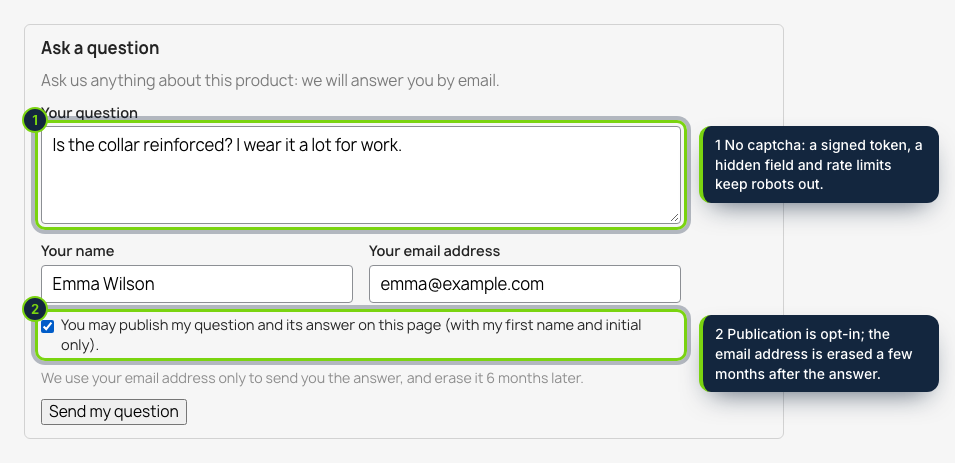
  • “Ask a question” form under the product sheet (displayFooterProduct) or as a tab of the Classic theme (displayProductExtraContent); signed-in customers find their name and email filled in
  • Customers › Product questions in the back office: status tabs with counts, a product search box instead of typed IDs, words search, spam in one click
  • Answer emailed with PrestaShop’s Mail::send in the language of the question, using the module’s own templates; a “new question” email to the shop
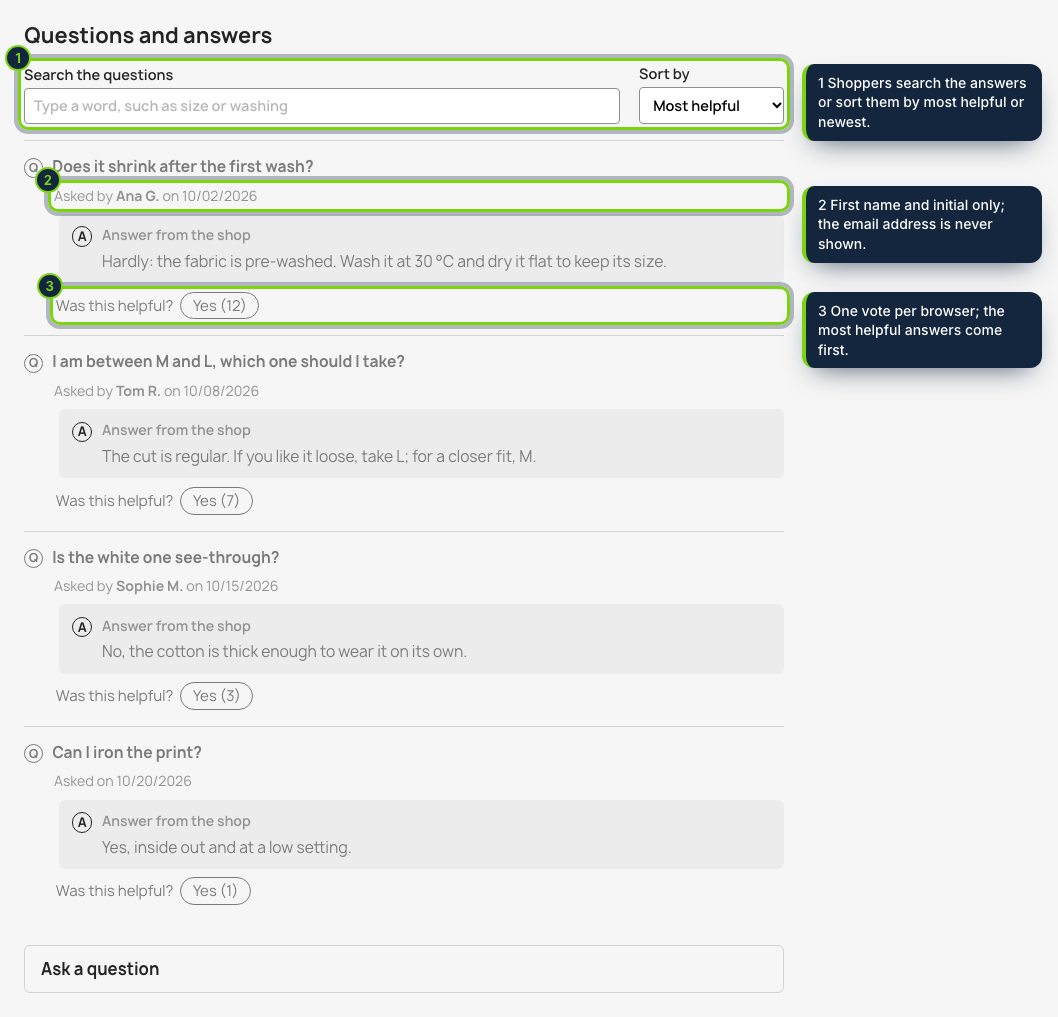
  • Publication only when the visitor ticks it; first name and initial shown, email address never; questions can be corrected before they go live
  • Spam protection without captcha: signed token fetched by the browser, honeypot, rate limits per IP hash and email, link limit and banned words
  • FAQ block on category and manufacturer pages (displayFooterCategory) with the shop’s own Q&As and product answers you pick, plus optional FAQPage JSON-LD
  • Search, sort and “Was this helpful?” votes on the product page; the same HTML for every visitor, so full-page caches keep working
  • Email addresses erased after a set number of months, export or deletion per email address; PrestaShop 8.2 and 9, no override

A product sheet answers the questions you thought of. The rest — “will it fit a 60 cm sink?”, “is the white one see-through?” — end up in your contact form, or the shopper simply leaves. Product Questions & Answers puts an Ask a question form right on the sheet, ties every question to its product and lets you answer it once for everyone.

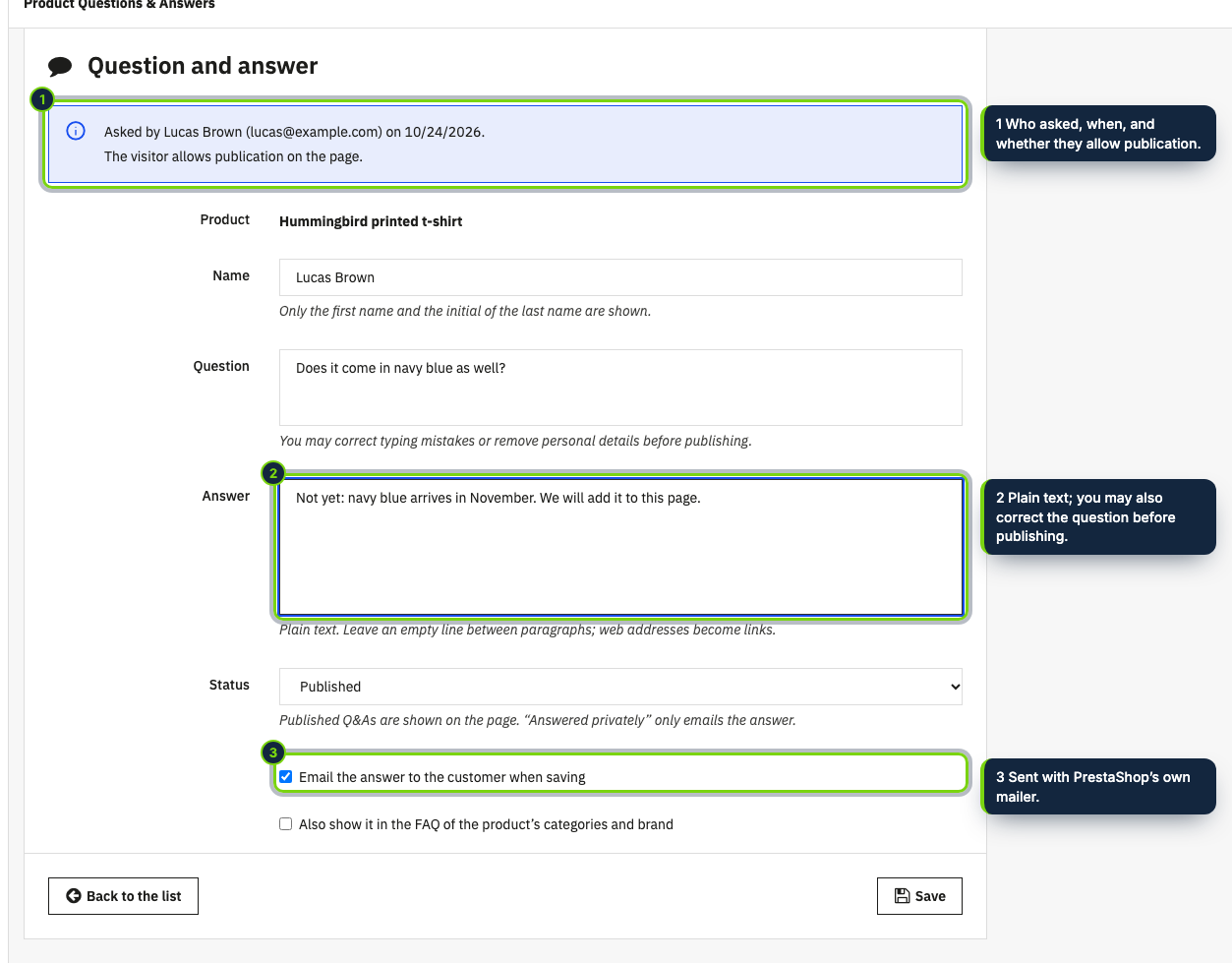
You reply from the back office; the customer receives the answer by email in the language they wrote in. If they ticked “you may publish my question”, the question and your answer appear under the product with their first name and initial, ready for the next shopper to search, sort and vote as helpful.

How it fits into PrestaShop

Back office
Customers › Product questions opens the module page with the questions by status, the editor, the settings and the privacy tools. The product page shows, in its Modules tab, how many questions the product has and links to answer them. Products, categories and manufacturers are chosen with search boxes.
Product sheet
A block in displayFooterProduct, or a tab next to Description in the theme’s own product tabs (displayProductExtraContent). Category and manufacturer pages get a FAQ block through displayFooterCategory.
Email
PrestaShop’s mailer (Mail::send) with the module’s templates, so your SMTP settings apply.
Caching
The block is identical for every visitor; the token and the customer’s details come from the module’s endpoint when the form is used. Saving a Q&A fires the object update hook, so page caches refresh.
Tested on PrestaShop 8.2 and 9.0 with PHP 8.1+, Classic theme. No override.

Installation

  1. Step 1

    Download the zip from your ecom-addons.com account.

  2. Step 2

    Modules › Module Manager › Upload a module, choose the zip.

  3. Step 3

    Open Customers › Product questions and check the settings (notification email, retention, banned words).

Download the step-by-step guide (PDF)

FAQ

Do shoppers need an account?

No. Guests give a name and an email address; signed-in customers have them filled in.

Is anything published without consent?

Never. A visitor who does not tick the box gets the answer by email only, and the email address is never shown.

Will it show Google FAQ snippets?

We cannot promise that: since 2023 Google shows FAQ results only for some government and health sites. The FAQPage markup of category and brand pages is valid, nothing more.

Does it work with Product Tabs & Custom Fields?

Yes. Our Q&A tab sits next to its FAQ tab, and only Product Tabs prints FAQPage on product pages, so there is never a duplicate.

Version history

  1. Loading…

Reviews

Loading…