
Features
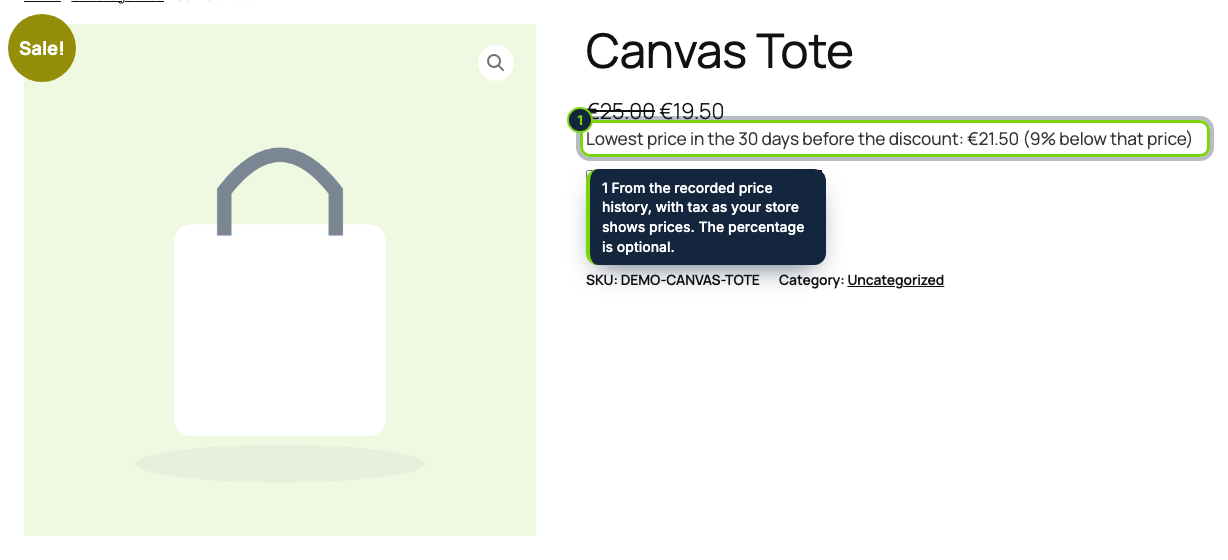
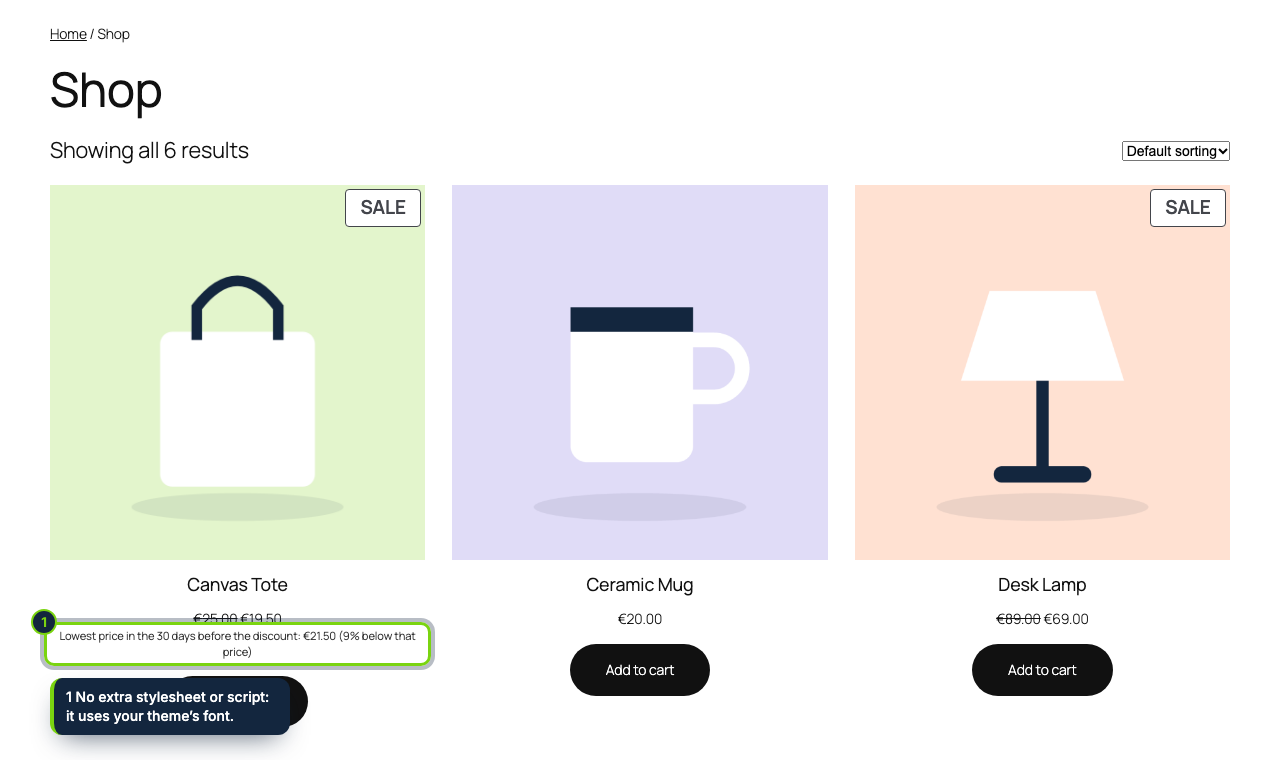
- Hooks the woocommerce_get_price_html filter, so the line inherits your theme on single product, shop and category pages and inside WooCommerce product blocks
- Same result in block themes and classic themes, with no extra stylesheet or script to enqueue
- Variable products: each variation on sale gets its own line once the shopper picks it
- Logged on product and variation save, when WooCommerce starts or ends a scheduled sale, and by a daily WP-Cron event for the whole catalogue
- "Price history" meta box on the product edit screen in wp-admin, covering the product and its variations
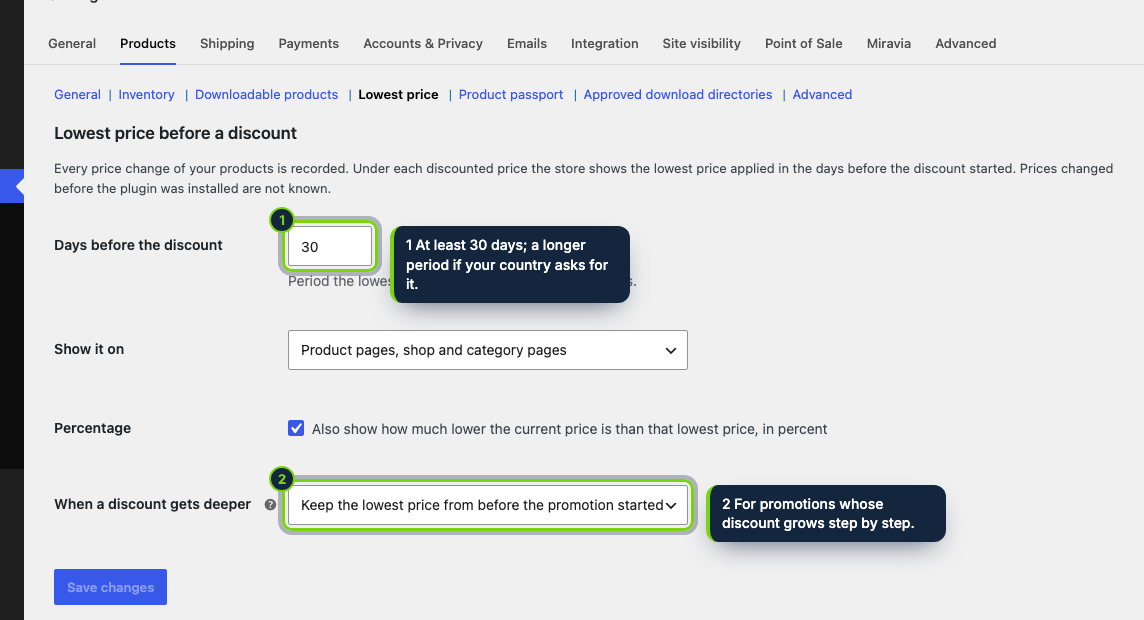
- Options under WooCommerce › Settings › Products › Lowest price
- Follows your store tax display setting; percentage off the prior price available as an option
WooCommerce lets you set a sale price and schedule its dates, then forgets what the product cost in the weeks before. EU price rules do not forget: article 6a of Directive 98/6/EC, in force since 28 May 2022 through the Omnibus Directive (EU) 2019/2161, wants each announced reduction to come with the prior price, meaning the lowest price charged during no less than 30 days before the reduction. This plugin keeps that log in your WordPress database and adds the number to your storefront.
How it fits into WooCommerce
- Requirements
- WooCommerce 11.x, WordPress 7.0 or later, PHP 8.1 or later. WP-Cron must run (the default), or a
real cron must call
wp-cron.php. - Storefront
- WooCommerce builds every price with
get_price_html(); the plugin appends its line there, which is why it shows the same way in classic templates and in block themes, on product pages and in product blocks. - What counts as a discount
- A sale price lower than the regular price. A row is written whenever either of them changes, and also when a discounted product is displayed.
- wp-admin
- A section in the Products tab of WooCommerce settings with four options (days, where to show it, percentage, deeper discounts) and a meta box on each product with the start of the current sale and the latest changes.
- Data
- One custom table, prices and dates only, no personal data and no external service. The daily event drops rows older than a year unless a running sale still needs them. The plugin declares compatibility with HPOS and with the cart and checkout blocks.
Installation
- Step 1
Download the zip from My account › Downloads on ecom-addons.com.
- Step 2
In wp-admin, go to Plugins › Add New Plugin › Upload Plugin, choose the zip, then Install Now and Activate.
- Step 3
Wait about a minute: the plugin records the current price of every product, then the log grows on its own.
- Step 4
Review the options in WooCommerce › Settings › Products › Lowest price.
FAQ
My scheduled sale starts at midnight and nobody saves the product. Is it picked up?
Yes. The start and end of WooCommerce scheduled sales are recorded, and the daily WP-Cron run checks the whole catalogue as well.
A sale was already running when I activated the plugin. Why is there no line?
Without a price recorded before the sale, the plugin prints nothing rather than guess; the meta box of that product tells you why. Sales that start before 30 days of log exist show the lowest price known so far.
Can it show the reduction as a percentage?
Yes, optionally, counted from the prior price as the EU Court of Justice requires (case C-330/23), and only when the current price really sits below it. Swapping the crossed-out regular price itself is planned for a later version.
The plugin gives you the data and the line; checking how the rule, and the options your country took, apply to your shop is up to you. This page is not legal advice.
Version history
- Loading…
Reviews
Loading…
Bought it? Leave a review from your account.