
Features
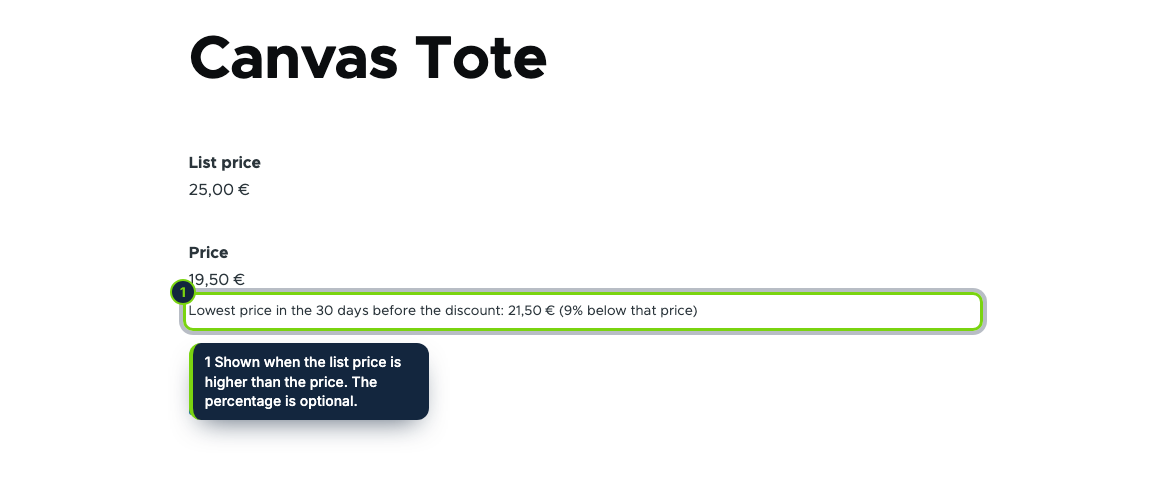
- Hooks into the rendering of the price field of product variations: product pages and any View that displays that field get the line
- On the product page the line changes with the variation the customer selects
- A discount here is a list price higher than the variation price; Commerce promotions applied in the cart are left out
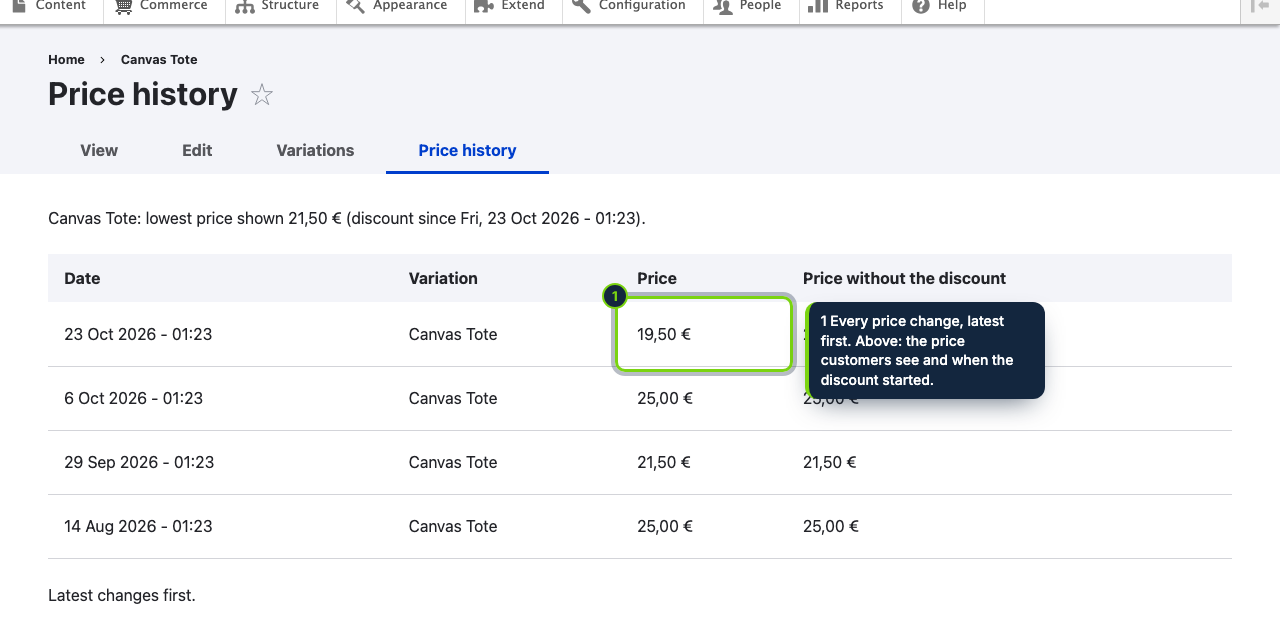
- Rows written on variation insert and update, by hook_cron for the whole catalogue (prices changed by imports included) and when a discounted price is rendered
- "Price history" tab next to Edit and Variations, behind its own permission
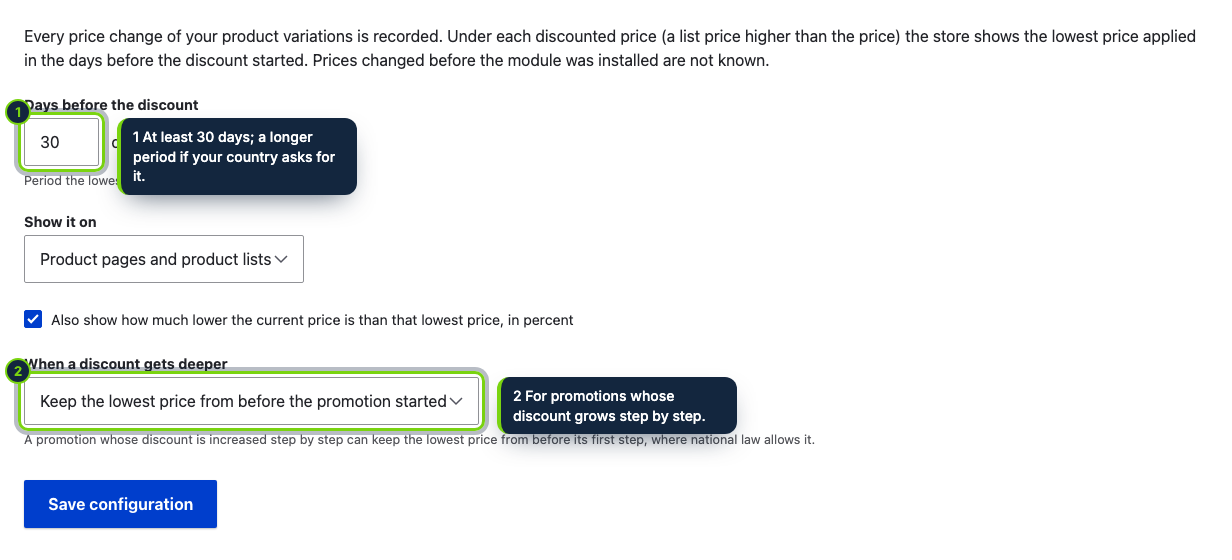
- Settings form under Commerce › Configuration › Lowest price; cache tags per variation keep cached pages in step with new prices
- Amount formatted in the currency of the variation; optional percentage counted from the prior price
Drupal Commerce shows a reduction when a product variation has a list price above its price, but it keeps no record of what that variation cost before. Article 6a of Directive 98/6/EC, added by the Omnibus Directive (EU) 2019/2161 and applicable since 28 May 2022, asks for exactly that: an announced reduction has to carry the prior price, the lowest one applied in a period of 30 days or more before it. This module builds the record on its own from the moment it is enabled and attaches the prior price to the variation's price field.
How it fits into Drupal Commerce
- Versions
- Drupal 11.3 with Commerce 3.x (the Product submodule) on PHP 8.3 or later. Cron must run, through Automated Cron or a system cron.
- Hooks
- Object-oriented hook classes react to the insert, update and delete of
commerce_product_variationentities, to cron, and to the preprocessing of thepricefield, so no template override is needed. - Where it shows
- Wherever the variation price field is rendered, product page and Views lists alike. A setting can limit it to the canonical product page.
- Store admin
- The settings route
/admin/commerce/config/lowest-pricetakes the "administer commerce_product" permission; the Price history tab takes "View the price history of products", which you grant per role. - Data
- A dedicated database table with prices and dates, no personal data, no external service. Cron removes rows older than a year unless a running discount still relies on them.
Installation
- Step 1
Download the zip from My account › Downloads on ecom-addons.com and unpack it so the folder is
modules/custom/ecom_addons_omnibus_price. - Step 2
Enable Lowest Price in 30 Days (Omnibus) in Extend, or run
drush en ecom_addons_omnibus_price. The current price of every variation is recorded straight away. - Step 3
In People › Permissions, give View the price history of products to the roles that manage the catalogue.
- Step 4
Make sure cron runs, then adjust the four settings (days, where to show it, percentage, deeper discounts).
FAQ
I give discounts with Commerce promotions. Will the line appear?
No. Promotions are applied in the cart, not on the product page, so the module does not treat them as announced price reductions. Only a list price higher than the price counts.
My catalogue is updated by a feed or a migration. Are those prices caught?
Yes: besides the variation save hooks, the daily cron run records the price of the whole catalogue.
A variation was already reduced when I enabled the module. What happens?
The line stays hidden, since no earlier price exists; the Price history tab explains it. Variations reduced before 30 days of history exist show the lowest known price. Per-customer-group histories and replacing the crossed-out price are planned for a later version.
Should you announce discounts as a percentage, the optional figure is counted from the prior price, following the EU Court of Justice in case C-330/23. Which national options apply to your store is for you to verify; the module does not give legal advice.
Version history
- Loading…
Reviews
Loading…
Bought it? Leave a review from your account.